
Type your keyword below

12 Essential University Reports for Better Decision-Making

Universities need more than access to institutional data; they need the ability to turn that data into decisions that improve performance. When leadership can clearly track student retention, academic progression, enrolment, financial health, and faculty capacity, it becomes easier to identify gaps, allocate resources, and address challenges before they affect institutional outcomes.

A well-structured reporting framework helps university leaders move from reactive problem-solving to proactive management. It brings greater visibility into what is working, where performance is declining, and which areas require immediate attention. Instead of waiting for end-of-semester reviews or manually consolidating departmental spreadsheets, decision-makers can work with consistent, timely information.

The result is a more accountable and responsive institution: student support can be directed towards those who need it, academic programmes can be evaluated using measurable outcomes, financial risks can be identified earlier, and strategic priorities can be monitored against actual performance.

Key Takeaways

  • Prioritise reports that answer important academic, financial and operational questions.
  • Monitor student retention, academic progression and graduate outcomes together.
  • Use admissions and financial reports to identify performance gaps early.
  • Standardise KPIs to make departmental and institutional comparisons meaningful.
  • Reduce manual reporting through automation and role-based dashboards.
  • Use exception reporting to focus attention on issues that require intervention.

12 Essential Reports Every University Should Monitor

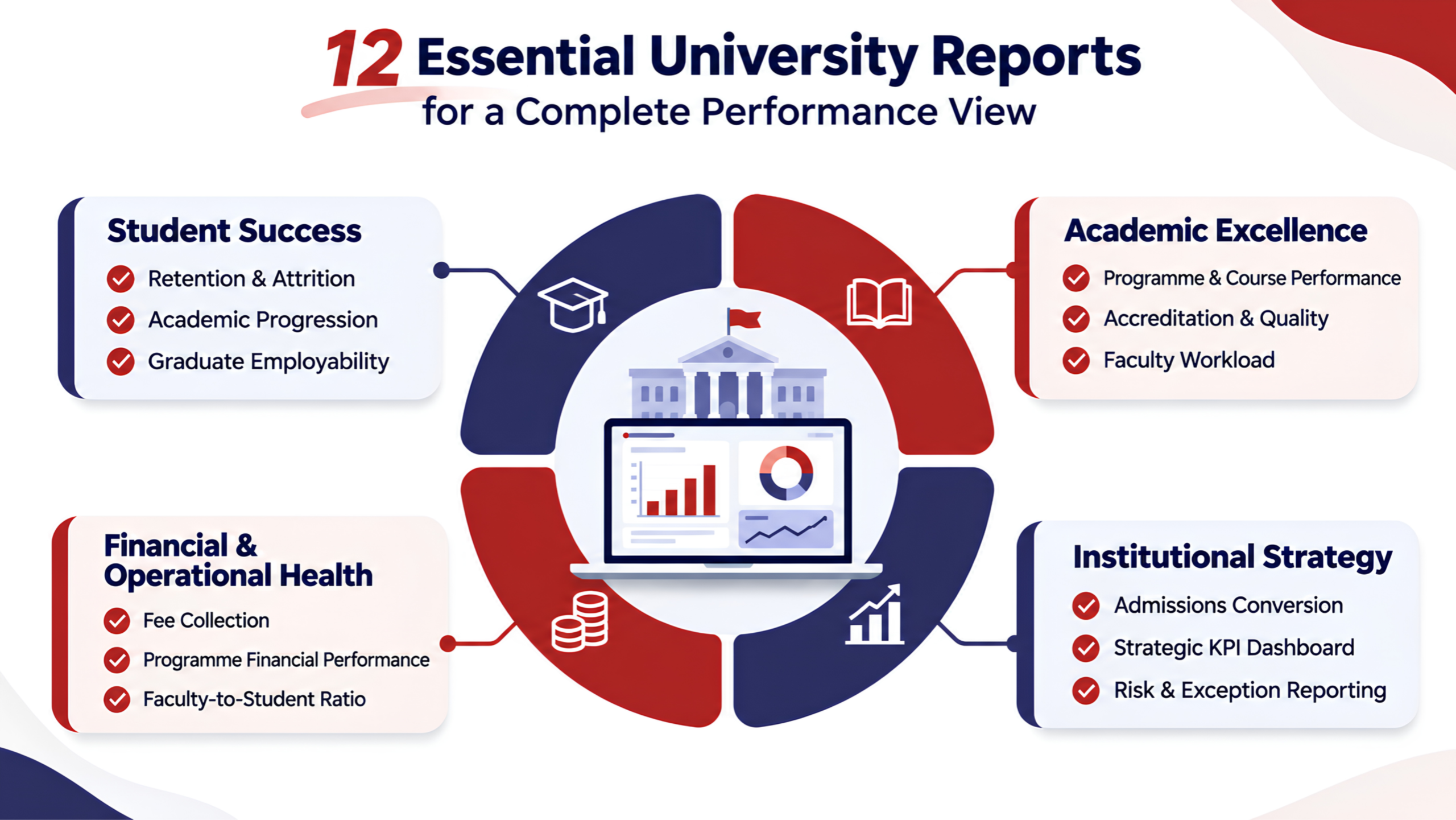
University leaders need different types of reports to understand institutional performance, from student success and academic quality to financial health and operational efficiency. The following 12 reports provide a practical starting point for building a more informed, data-driven approach to university management.

1. Student Retention and Attrition Report

A student retention and attrition report helps universities understand how many students continue their studies, withdraw, or discontinue their programmes over a defined period. It can track retention rates by academic year, semester, programme, department, campus, and student cohort.

Beyond measuring the number of students who leave, this report can help identify patterns behind attrition. For example, leadership may notice that withdrawals are concentrated in a particular semester, programme, or student group. By examining these patterns alongside attendance, academic performance, and outstanding fees, institutions can investigate potential causes and plan timely interventions.

Outcome: Earlier identification of at-risk students and more targeted student retention initiatives.
 

University Reports

2. Academic Progression and Graduation Report

This report provides visibility into how students progress through their academic programmes. It tracks completed credits, examination results, backlogs, course completion, graduation eligibility, and time taken to complete a qualification.

The information helps academic leaders identify where students are experiencing delays and whether particular courses or programme requirements are affecting progression. The OECD’s Education at a Glance 2025 highlights the importance of monitoring completion timelines, reporting that 43% of new bachelor’s students across OECD countries and partner economies graduate within the programme’s theoretical duration.

Universities can use progression data to review academic support mechanisms, assess curriculum requirements and identify students who may need additional guidance to complete their programmes on time.

Outcome: Better monitoring of academic progress, improved completion planning and more informed decisions about academic support.

3. Programme and Course Performance Report

A programme and course performance report brings together information such as pass rates, examination results, assessment outcomes, course completion and student performance across different academic terms.

By comparing results across departments, courses, and semesters, academic leaders can identify subjects with consistently low pass rates, variations in assessment outcomes, or programmes that may require curriculum review. It also provides a basis for evaluating whether teaching and learning interventions are producing the expected improvements.

This report can support discussions between department heads, faculty members, and academic committees by giving them a shared view of programme performance rather than relying on isolated departmental updates.

Outcome: More evidence-based curriculum reviews and targeted improvements in teaching and learning.

4. Graduate Employability and Placement Report

Universities need to understand what happens after students complete their education. A graduate employability and placement report can track placement rates, employment status, time to employment, sector-wise distribution, and the relevance of graduates’ roles to their qualifications.

When this information is collected consistently, institutions can evaluate how effectively their programmes prepare students for the employment market. It can also help identify differences in outcomes across programmes and graduating batches.

For university leadership, these insights can inform curriculum development, industry partnerships, career services, and programme-level reviews. Institutions can also use graduate feedback and employer input to understand where additional skills development may be required.

Outcome: Better visibility into graduate outcomes and stronger alignment between academic programmes and employment needs.

5. Enrolment and Admissions Conversion Report

An enrolment and admissions conversion report tracks the journey from application to confirmed admission. It can include applications received, offers issued, accepted offers, completed enrolments and conversion rates across programmes, intake periods and recruitment channels.

The report helps admissions teams identify where prospective students are dropping out of the process. For example, a high number of applications but fewer confirmed enrolments may indicate delays, incomplete documentation, communication gaps or challenges during the admission process.

By reviewing these stages, institutions can assess recruitment performance, improve follow-up processes and make better-informed decisions about admission planning and student recruitment priorities.

Outcome: Improved admissions visibility, more effective recruitment planning and fewer missed enrolment opportunities.

6. Accreditation and Quality Assurance Report

Accreditation and quality assurance reports help universities monitor the academic and institutional information required for internal reviews, regulatory reporting and external accreditation processes. Depending on institutional requirements, these reports may include programme outcomes, faculty qualifications, assessment results, student feedback and quality indicators.

Maintaining this information in a structured format makes it easier for institutions to review performance against defined standards and identify documentation gaps before an evaluation or accreditation exercise. It also supports more consistent reporting across departments and academic programmes.

Rather than collecting information only when an accreditation deadline approaches, institutions can use regular reporting to maintain visibility into quality indicators throughout the academic year.

Outcome: Better preparedness for accreditation reviews and more consistent monitoring of academic quality.

7. Fee Collection and Outstanding Receivables Report

A fee collection report gives finance teams and university leadership a clear view of fee payments, outstanding balances, overdue accounts, payment trends, and collections across programmes or student categories.

It helps institutions understand where payment delays are occurring and how outstanding receivables may affect cash flow. Leadership can review collection patterns across academic terms, identify recurring delays, and evaluate whether payment schedules or communication processes need attention.

When fee information is connected with student records, authorised teams can also access relevant financial information without repeatedly reconciling data across separate systems.

Outcome: Greater financial visibility, better receivables monitoring and more timely follow-up on outstanding payments.

8. Programme-Wise Financial Performance Report

A programme-wise financial performance report helps university management evaluate the financial position of individual academic programmes. It can bring together information on enrolment, fee revenue, operational expenditure and resource utilisation, depending on the financial data available to the institution.

This allows leadership to compare programme-level performance and understand how changes in enrolment or costs may affect financial sustainability. It can also support decisions about resource allocation, programme expansion and long-term academic planning.

The report should be interpreted alongside academic quality, student demand and institutional priorities. Financial performance alone should not determine the value or continuation of an academic programme.

Outcome: More informed resource allocation and stronger programme-level financial planning.

9. Faculty Workload and Utilisation Report

Faculty workload reports provide visibility into teaching hours, course allocations, academic responsibilities, and workload distribution across departments. They help academic administrators understand how teaching responsibilities are assigned and whether workloads are balanced.

The report can highlight departments with concentrated teaching demands, faculty members handling multiple courses, or areas where additional academic resources may be required. It can also support workload planning before a new academic term begins.

By reviewing this information regularly, institutions can make staffing decisions based on actual academic requirements and avoid relying solely on manual workload calculations.

Outcome: More balanced faculty allocation and better academic resource planning.

10. Faculty-to-Student Ratio and Academic Capacity Report

This report compares student enrolment with available faculty strength across programmes, departments, and campuses. It helps institutions assess whether their current academic capacity is aligned with student numbers and programme requirements.

Tracking this ratio over multiple academic terms can reveal where enrolment growth is putting pressure on teaching resources. It can also help leadership identify departments that may require additional faculty, revised class allocation, or changes to academic capacity planning.

The report becomes particularly useful during admission planning, programme expansion, and institutional reviews, when leadership needs to understand whether available resources can support projected student numbers.

Outcome: Better visibility into academic capacity and more informed faculty recruitment and expansion decisions.

11. Institutional KPI and Strategic Performance Dashboard

An institutional KPI dashboard brings key performance indicators into one view, allowing university leadership to monitor progress against strategic objectives. Depending on institutional priorities, it may include enrolment, retention, graduation, employability, financial performance, academic quality, and operational indicators.

Instead of reviewing each department’s performance in isolation, leadership can compare results across institutional priorities and identify areas where progress is on track or falling behind. Consistent KPI definitions are essential so that different departments measure and report performance in comparable ways.

A well-designed dashboard should also allow authorised users to move from high-level indicators to the underlying information needed to understand performance changes.

Outcome: Clearer strategic oversight, stronger accountability and more consistent performance reviews.

12. Institutional Risk and Exception Report

An institutional risk and exception report helps universities identify unusual patterns or performance indicators that require attention. Examples may include declining attendance, increasing academic backlogs, overdue fees, lower retention, missed departmental targets, or delays in key administrative processes.

Instead of requiring leaders to review every record manually, exception-based reporting highlights areas that fall outside defined thresholds or expected patterns. This helps the relevant teams investigate issues and prioritise corrective action.

Outcome: Earlier visibility into emerging institutional challenges and a more proactive approach to risk management.

How Much Time Does Manual Reporting Cost Universities?

Manual reporting can consume significant institutional resources, particularly when teams must collect information from multiple departments, reconcile spreadsheets, and respond to repeated data requests.

Research from the Education Advisory Board (EAB), in its Activating the Analytical Mandate study, illustrates the scale of this challenge. The study found that 25%–100% of decision-support team capacity at the institutions examined was being used to respond to ad hoc data requests. One research university reported spending 3,500 hours over 12 months on such requests, while typical unit-level requests could face backlogs of three to six weeks.

These findings are specific to the institutions examined, but they highlight a wider management challenge: when reporting depends heavily on manual data collection, the time available for analysis and strategic support can become limited.

From Academia by Serosoft’s perspective, reporting automation should be treated as an institutional productivity priority rather than simply an IT improvement. Universities can begin by standardising recurring academic, administrative and financial reports, establishing consistent KPI definitions, providing role-based dashboard access and using exception-based reporting to highlight issues that require attention. This enables teams to spend less time preparing reports and more time analysing insights to improve institutional performance. 

Why Connected Data Matters More Than More Data

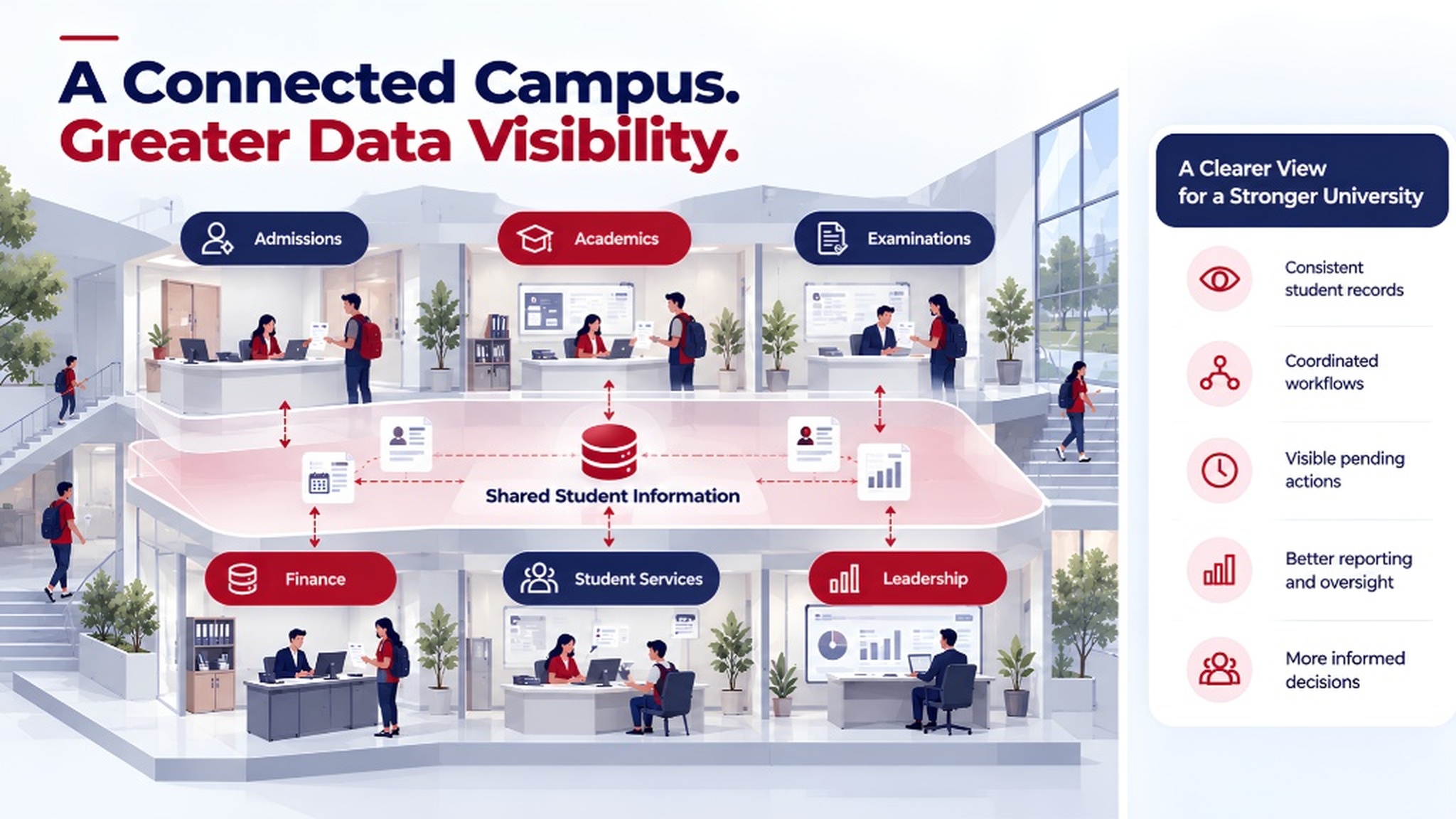
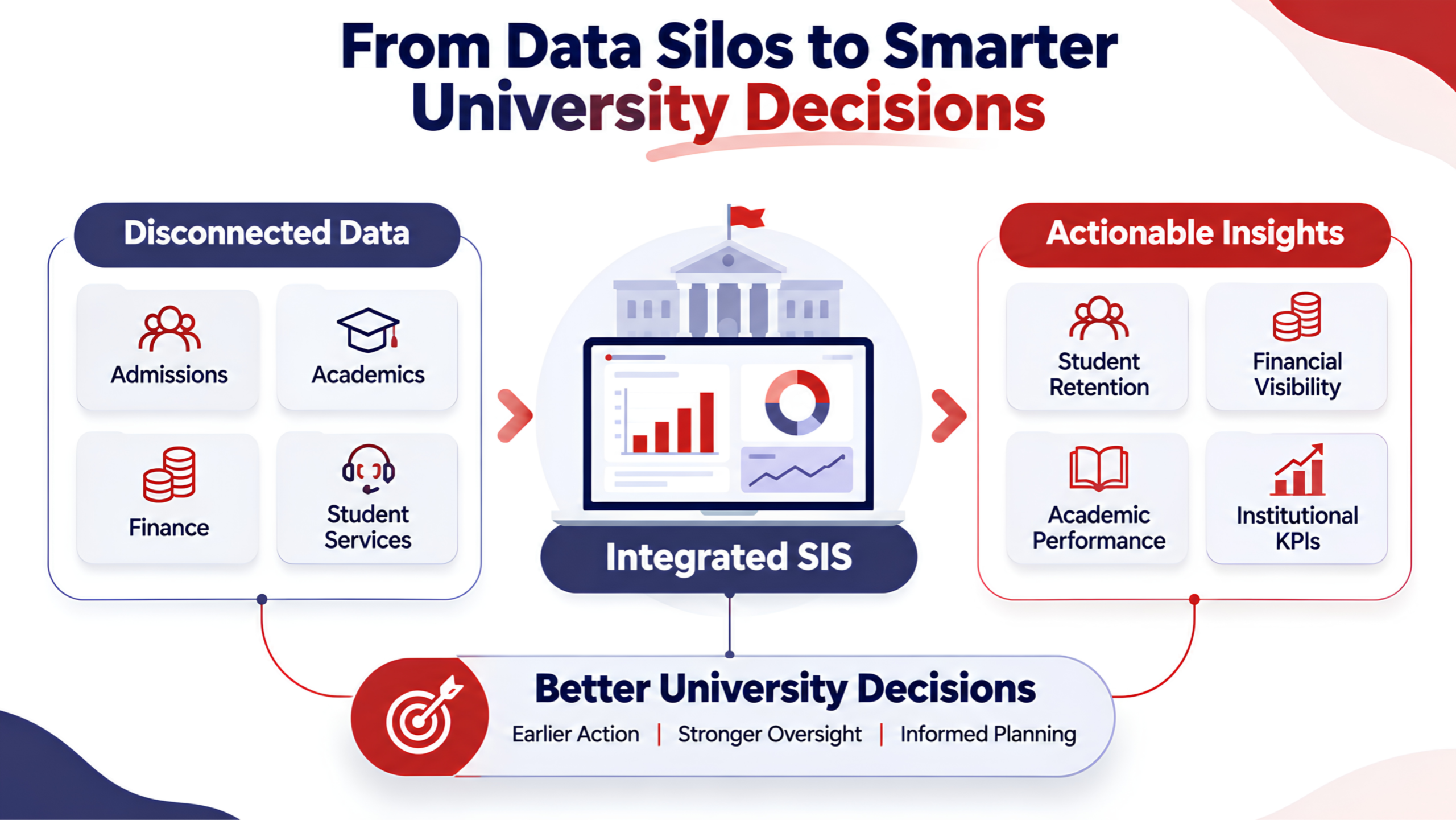
Having a large volume of institutional data does not automatically lead to better decisions. When admissions, academics, finance, and student services operate with disconnected information, leadership may struggle to establish a complete picture of institutional performance.

The EDUCAUSE 2024 Analytics QuickPoll identifies data silos, data quality and system integration challenges, as well as limited analytics expertise and data literacy, among the barriers to wider analytics adoption. These findings underline why institutions need to focus not only on collecting data but also on making it consistent, connected and usable.

Consider an annual performance review. Admissions data may show an increase in enrolment, while academic records indicate declining progression and finance reports show rising outstanding fees. If these datasets cannot be viewed together, leadership may find it difficult to understand the relationship between these trends and determine where intervention is needed.
 

University Management System

Drawing on our experience in higher education technology, Academia by Serosoft emphasises the importance of a connected reporting environment that brings institutional information together while maintaining appropriate access controls. Universities should prioritise standardised KPIs, role-based dashboards and the ability to drill down from institutional indicators to underlying records. Where reliable historical data is available, trend analysis and predictive capabilities can further support the identification of emerging concerns. This approach helps shorten the distance between identifying a performance gap, understanding its cause, and deciding what to do next. 

How a Modern SIS Makes Reporting Actionable

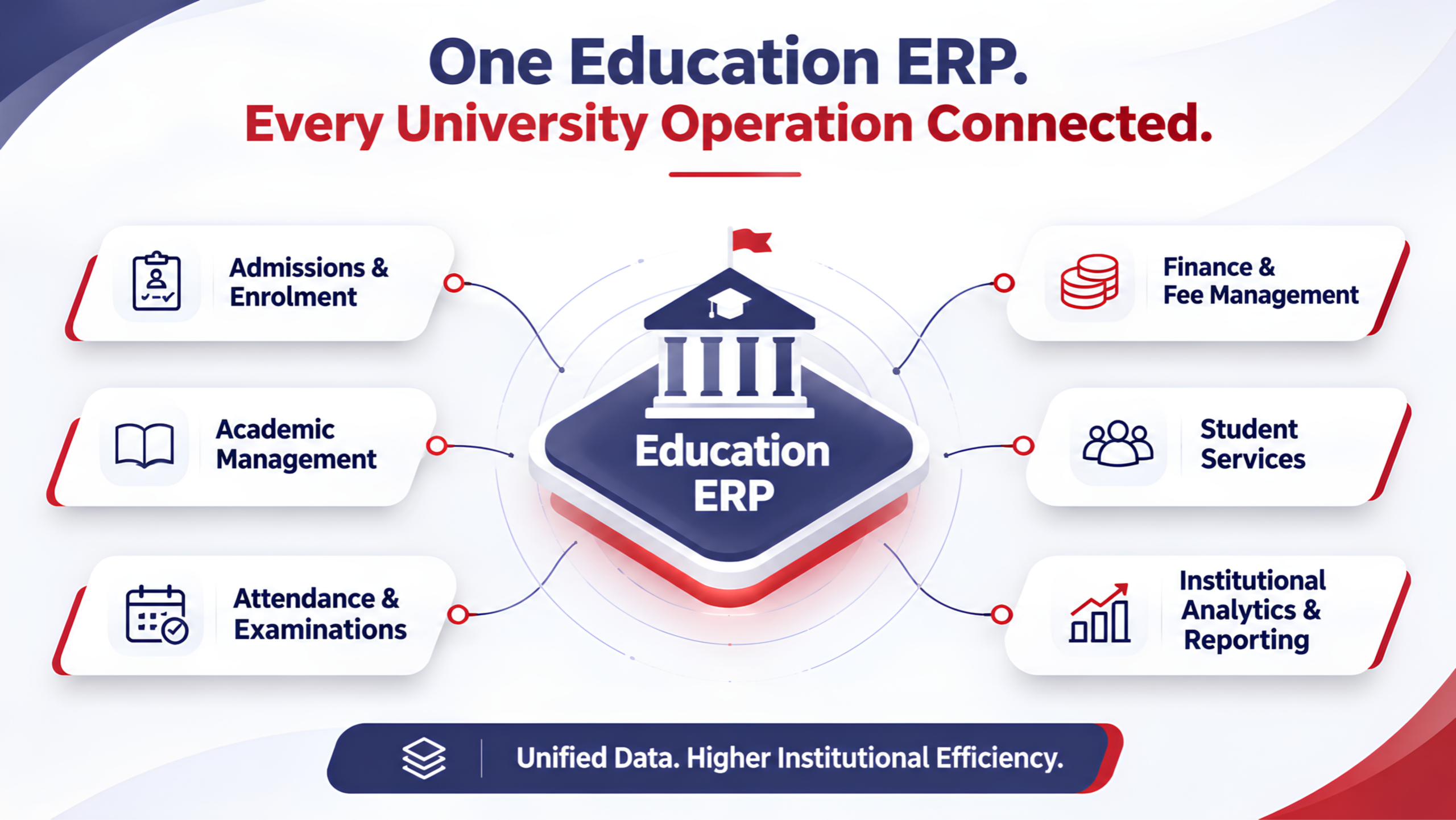
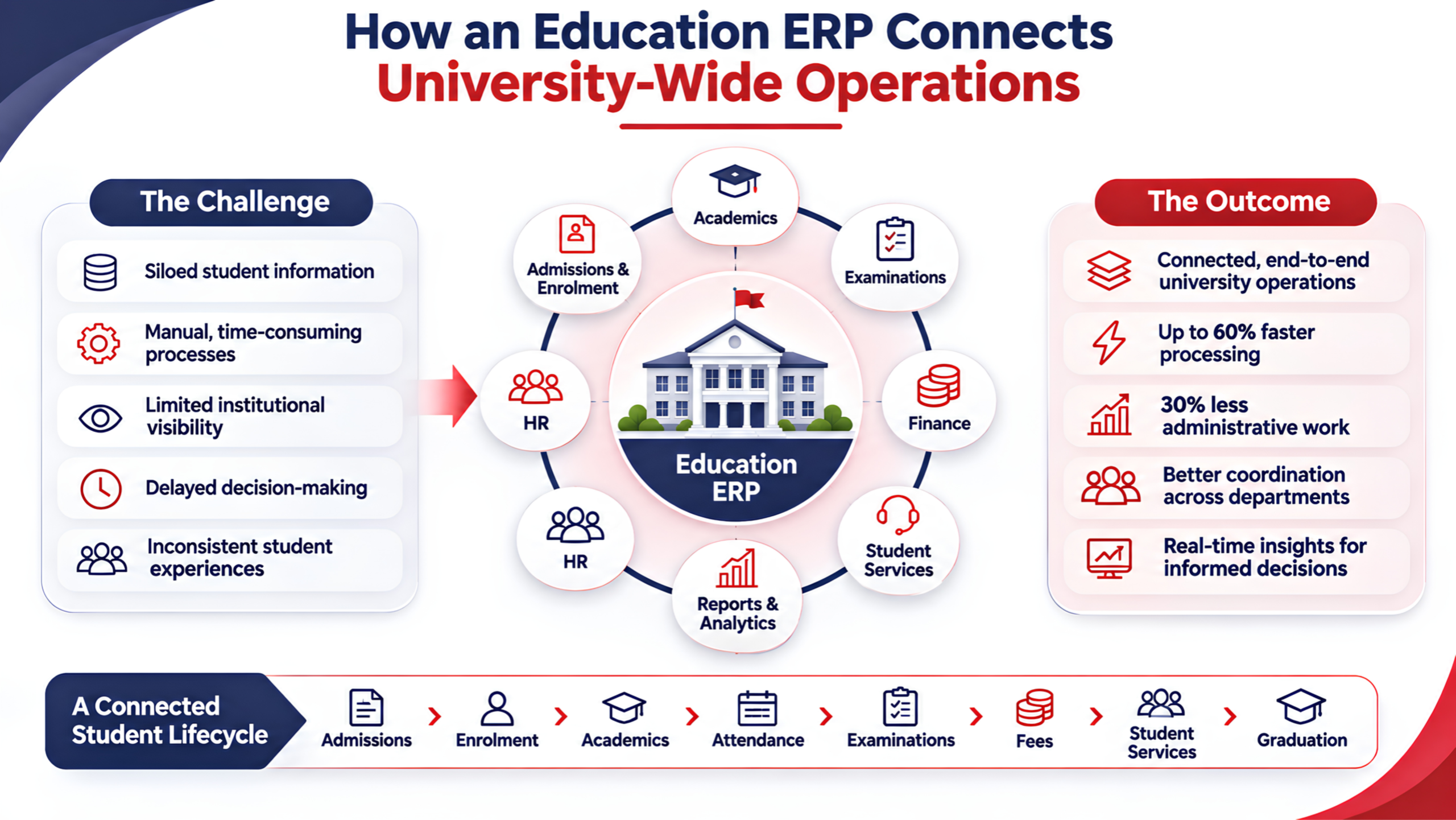
A modern Student Information System connects information across the student lifecycle:

Admissions → Enrolment → Fees →  Academics → Attendance → Examinations → Student Services → Graduation

When these stages are supported by connected institutional information, authorised teams can work with a more consistent view of student and academic records. This reduces the need to repeatedly gather and reconcile information from separate departmental sources.

The Ashoka Education Foundation case study illustrates how digital workflows can improve institutional operations. Through its implementation of Academia, the institution reported:

  • 40% time saved through automated marksheet generation.
  • 20% time saved through online payment processing.
  • 10 person-days saved through automated circulars and reminders.

These are operational automation outcomes reported in the case study, rather than direct measurements of reporting time. They demonstrate how digitising institutional processes can reduce manual effort and improve the availability of structured information for day-to-day operations.

For universities evaluating an SIS, the important consideration is whether the system can support reliable information flows, consistent reporting, and timely access to the information different teams need.

Turn Institutional Data into Better Decisions

University reporting should do more than present numbers. It should help leadership understand institutional performance, identify emerging challenges, and make decisions with greater confidence.

With connected student information, structured reporting, and actionable institutional insights, universities can reduce dependence on manual data consolidation and strengthen oversight across academic and administrative functions.

Discover how Academia by Serosoft can support connected institutional information and more informed university management. Explore Academia’s solutions.

Frequently Asked Questions

1. What are the most important reports for university management?

Key reports include student retention and attrition, academic progression and graduation, programme and course performance, graduate employability and placement, enrolment and admissions conversion, accreditation and quality assurance, fee collection and outstanding receivables, programme-wise financial performance, faculty workload and utilisation, faculty-to-student ratio and academic capacity, institutional KPI and strategic performance, and institutional risk and exception reports.

The exact priorities depend on the university’s strategic goals and reporting requirements.

2. How does an SIS improve university decision-making?

An SIS helps bring student and institutional information into a more structured environment. This can reduce dependence on disconnected records and manual consolidation, giving authorised decision-makers better visibility into academic, administrative, and financial performance.

3. What is the difference between an SIS report and a university performance dashboard?

An SIS report generally presents specific information for a defined purpose, such as fee collection, attendance, or academic progression. A performance dashboard brings selected indicators together to provide a broader view of institutional performance and progress against key objectives.

4. How can universities reduce manual reporting time?

Universities can reduce manual reporting by automating recurring reports, standardising data definitions, connecting departmental information, and providing authorised teams with self-service dashboards. Exception-based reporting can also reduce the need to review every record manually.

5. How often should universities review institutional reports?

The review frequency depends on the type of information and the decision it supports. Attendance, fee collections, and admissions may require frequent monitoring, while programme performance, graduation trends, and strategic KPIs may be reviewed monthly, each semester, or annually.

6. What should universities look for in an SIS reporting system?

Universities should assess whether an SIS supports accurate and consistent reporting, integration across institutional functions, configurable reports, role-based access, dashboards, and the ability to analyse trends. Reporting should align with institutional goals, regulatory requirements, and data governance policies.

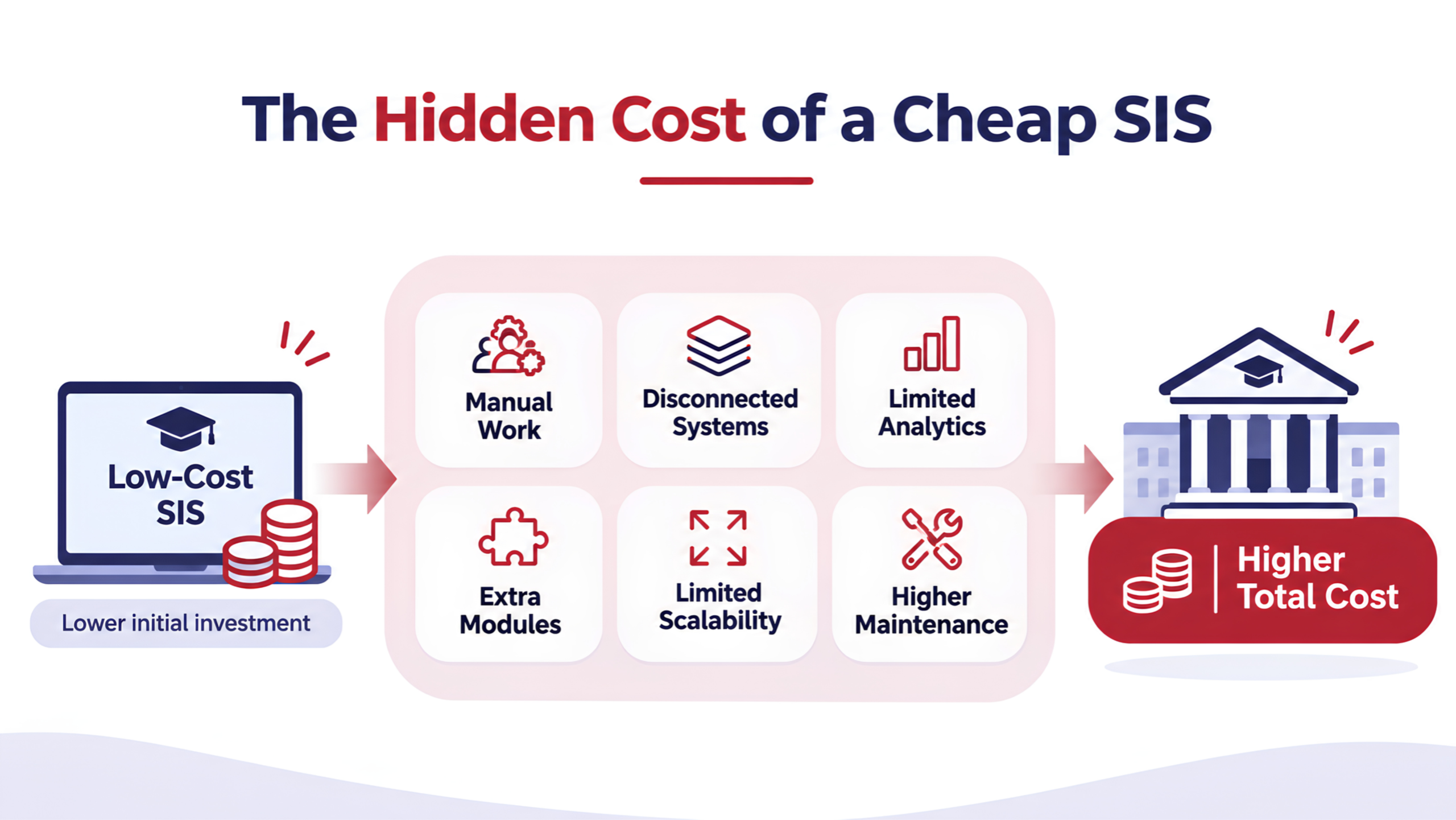
Why a Cheaper SIS Can Cost Universities More in the Long Run

Choosing a Student Information System (SIS) based primarily on its initial price can create significant financial challenges for universities. While a cheaper solution may appear attractive, hidden expenses associated with manual processes, disconnected systems, limited analytics, additional modules, and maintenance can increase the overall cost of ownership.

The real cost of an SIS extends beyond licensing and implementation. Universities must evaluate how effectively it supports admissions, enrolment, academics, attendance, examinations, fees, student services, and institutional growth.

The smarter approach is to evaluate an SIS based on its Total Cost of Ownership (TCO), operational efficiency, integration capabilities, and long-term value rather than its purchase price alone.

Key Takeaways: What Should Universities Remember Before Buying an SIS?

  • Initial price is not total cost: Licensing is only one component of the investment.
  • Manual work increases expenses: Repetitive processes consume staff time and resources.
  • Disconnected systems create complexity: Integrations and duplicate records increase operational effort.
  • Limited analytics affect decisions: Fragmented information restricts institutional visibility.
  • Scalability matters: Technology must accommodate institutional growth.
  • TCO should guide procurement: Evaluate implementation, maintenance, integrations, and upgrades.
  • Value matters more than price: Choose an SIS that supports long-term institutional efficiency.

1. Why Can a Cheaper Student Information System Become More Expensive?

A low-cost SIS may initially reduce technology expenditure, but its limitations can create additional expenses as institutional requirements grow.

For example, a university might purchase an affordable system to manage student records and admissions. However, when it needs advanced reporting, financial management, integrations, or multi-campus administration, additional software, customisations, and third-party services may become necessary.

As a result, universities may face several challenges, including increased manual work and administrative workloads, duplicate student records and data inconsistencies, delayed application processing and fee reconciliation, disconnected systems and departmental data silos, higher integration and middleware costs, limited reporting and analytics capabilities, poor visibility into admissions, fee payments, and student retention, additional charges for essential modules, expensive customisations, limited scalability as enrolments and campuses grow, higher infrastructure and maintenance expenses, costly software upgrades and technical support, data migration and system replacement expenses, additional staff training requirements, and operational inefficiencies that delay institutional decision-making. 

These expenses gradually eliminate the initial savings.

EDUCAUSE research on ERP implementation highlights that budget overruns and additional costs remain significant concerns for higher education institutions.

The important question is: How much will your SIS cost to operate, maintain, integrate, and scale over the next three to five years?

2. What Are the Hidden Costs of Choosing a low-cost local SIS?

Universities may encounter hidden expenses in several areas when a Student Information System lacks the capabilities required to support their operations. These costs often emerge gradually, affecting administrative efficiency, technology investments, and long-term institutional growth.


local SIS

A. How Does Manual Work Increase Administrative Costs?

When an SIS offers limited automation, employees rely on spreadsheets, emails, paper forms, and repetitive data entry.

This creates:

  • Duplicate student records.
  • Delayed application processing.
  • Manual fee reconciliation.
  • Repeated departmental coordination.
  • Increased chances of administrative errors.

These activities consume staff time and reduce operational productivity.

What to evaluate: Does the SIS automate routine workflows and reduce repetitive administrative work?

B. Why Do Disconnected Systems Increase Technology Costs?

Universities use multiple platforms for admissions, academics, finance, examinations, and student services. When these systems cannot communicate effectively, institutions may need additional integrations and middleware.

This leads to duplicate information, higher maintenance requirements, and fragmented reporting.

EDUCAUSE’s 2025 research on data modernization identified siloed departmental data as a major institutional data-management challenge.

What to evaluate: Can the SIS connect institutional information and integrate with existing applications?

C. How Can Limited Analytics Affect Institutional Decisions?

Universities generate valuable information through admissions, attendance, academic performance, and fee payments. However, limited reporting capabilities can make this information difficult to use.

Institutional leaders may struggle to identify:

  • Admission conversion bottlenecks.
  • Outstanding fee payments.
  • Student retention challenges.
  • Departmental inefficiencies.
  • Campus-level performance trends.

Academia’s expertise in higher education technology highlights the importance of connected institutional data. Universities need more than information storage; they need accessible insights that support informed decisions.

D. Why Do Additional Modules and Customisations Increase SIS Expenses?

Some solutions offer basic functionality at a lower price but charge separately for advanced requirements.

Additional expenses may include:

  • Advanced analytics and reporting.
  • Finance and accounting functionalities.
  • Examination management.
  • Multi-campus administration.
  • Workflow automation.
  • Custom dashboards and integrations.

Universities should understand which functionalities are included in the original quotation and which require additional investment.

E. How Can Limited Technology Restrict Institutional Growth?

An SIS suitable for a small institution may struggle as enrolments, campuses, and academic programmes increase.

Limited scalability can create performance issues, additional infrastructure requirements, expensive upgrades, or premature system replacement.

Universities should choose technology that can accommodate evolving institutional requirements.

F. How Do Maintenance and Upgrades Affect Long-Term SIS Costs?

The initial purchase is only one part of the investment. Universities must also account for technical support, maintenance, security updates, infrastructure, and software upgrades.

Insufficient support or limited upgrade flexibility can increase operational disruption and additional development costs.

What to evaluate: Are maintenance, upgrades, technical support, and service commitments clearly defined?

3. What Is the Difference Between a Low-Cost SIS and a Cost-Effective SIS?

A low-cost SIS focuses on reducing initial expenditure, whereas a cost-effective SIS focuses on delivering long-term operational and financial value. The difference becomes clearer when universities compare functionality, scalability, automation, and ongoing expenses.


Evaluation area Low-cost SIS Cost-effective SIS
Administration More manual work Greater automation
Data management Fragmented records Connected information
Analytics Limited reporting Better institutional visibility
Integrations Additional workarounds Defined integration capabilities
Modules Additional charges Transparent functional coverage
Scalability Potential growth limitations Support for evolving needs
Maintenance Potentially fragmented support Defined support arrangements

Price alone is not a reliable signal. A lower-priced SIS can be the right choice, and a higher-priced SIS is not automatically better. The objective is to identify the solution that delivers the strongest value relative to its total cost. 

4. How Do Hidden SIS Costs Affect Different University Departments?

The financial impact of an inadequate SIS extends across the institution. Limited automation, disconnected data, and repetitive processes can increase workloads and operational expenses across multiple departments.


Department Common challenge Potential impact
Admissions Manual application processing Delays and higher workload
Finance Disconnected payment records Revenue visibility challenges
Administration Repetitive data entry Increased operational costs
Academics Fragmented student records Information inconsistencies
IT Multiple disconnected applications Higher maintenance complexity
Leadership Delayed institutional reports Slower decision-making

For CFOs, unnecessary expenditure affects budgets. For CIOs, disconnected platforms increase IT complexity. For Registrars, manual processes affect student information management.

An SIS is therefore not simply an IT purchase. It is an institutional investment.

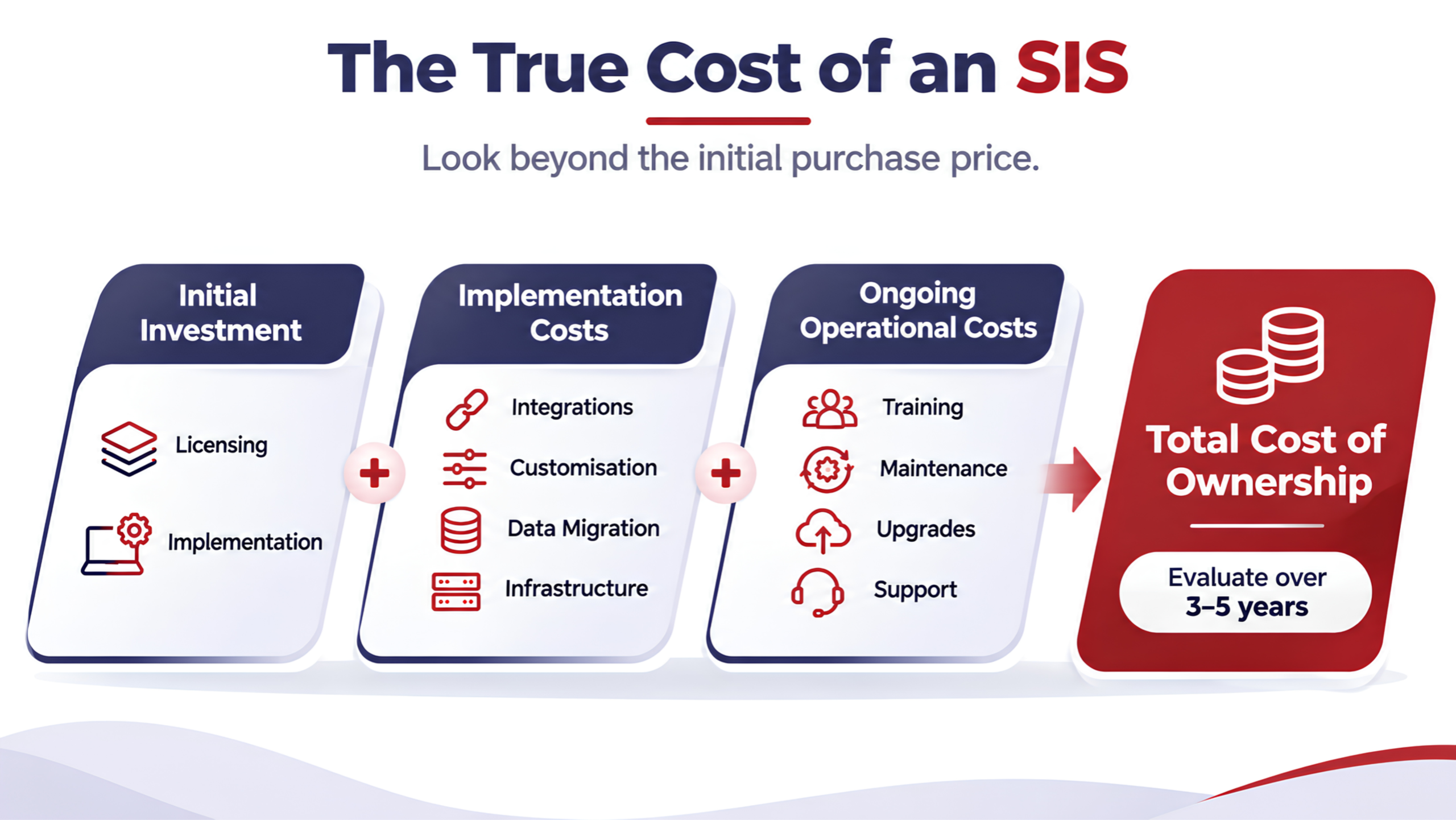
5. How Should Universities Calculate the Total Cost of Ownership of an SIS?

Total Cost of Ownership (TCO) represents the complete financial commitment involved in acquiring, implementing, operating, and maintaining an SIS over a defined period.

A practical calculation includes:

TCO = Licensing + Implementation + Integrations + Customisation + Infrastructure + Training + Maintenance + Upgrades + Internal Operational Costs.

Universities should also consider potential data migration and system replacement expenses.


Student Information System


Cost component Questions to ask vendors
Implementation What does the implementation fee include?
Licensing How are subscription fees calculated?
Integrations Are third-party integrations chargeable?
Customisation What are the costs of additional development?
Training Is staff training included?
Maintenance What are the recurring charges?
Upgrades Are future upgrades included?
Scalability How does pricing change with growth?
Data migration Are migration services included?

Comparing these expenses over a three-to-five-year period provides a more realistic financial assessment than comparing initial quotations alone.

6. What Should Universities Check Before Selecting an SIS?

Before selecting an SIS, universities should evaluate more than its purchase price and available features. A structured assessment of functionality, technology, integration, and long-term costs can help prevent unexpected expenses. 

Functional capabilities

  • Does it support the complete student lifecycle?
  • Can it automate routine administrative workflows?
  • Does it support academic and financial management?
  • Can departments access relevant student information?

Technology and integration

  • Can it integrate with existing applications?
  • Does it offer reliable reporting and analytics?
  • Can it support multiple campuses?
  • Are security and access controls addressed?

Financial considerations

  • Have we calculated the complete TCO?
  • Are implementation and migration costs transparent?
  • Are additional modules and customisations clearly priced?
  • Are maintenance and upgrades included?
  • Can the solution accommodate future requirements?

This evaluation helps institutions make informed purchasing decisions and minimise unexpected expenses.

7. How Can Academia by Serosoft Help Universities Move Beyond Hidden SIS Costs?

Academia by Serosoft offers Student Information System/Education ERP capabilities designed to support higher education institutions in managing academic and administrative operations.

Its capabilities help universities evaluate a more connected approach to institutional management.

Connected Institutional Workflows: Bring academic and administrative processes together through a unified technology environment.

Reduced Manual Effort: Digitise workflows and automate routine activities to improve administrative efficiency.

Better Institutional Visibility: Access institutional information and reporting capabilities to support informed decisions.

Integration Capabilities: Evaluate integration options to connect existing institutional applications and reduce fragmented workflows.

Support for Institutional Growth: Manage evolving academic and administrative requirements through Education ERP and SIS capabilities.

Academia’s expertise in higher education technology is centred on helping institutions move beyond basic student record management towards connected processes, improved visibility, and sustainable institutional growth.

The objective is not simply to purchase another software solution. It is to invest in technology that delivers lasting institutional value.

8. Why Should Universities Choose Value Over the Lowest SIS Price?

The lowest-priced SIS may reduce initial expenditure, but manual processes, disconnected platforms, additional module charges, and limited scalability can increase long-term costs.

Universities should evaluate software based on its total cost of ownership, functional coverage, integration capabilities, automation, and ability to support future growth.

A lower purchase price is only a saving when it delivers lower overall costs.

Choose technology that supports operational efficiency rather than creating additional institutional expenses.

Conclusion: Is Your University Saving Money or Creating a Bigger Expense?

A cheaper SIS may reduce initial technology expenditure, but if it creates additional manual work, disconnected systems, limited reporting, and recurring expenses, those savings can quickly disappear.

Universities need to evaluate technology based on its total cost of ownership and the value it delivers over time.

The right Student Information System should simplify processes, connect departments, improve information visibility, and support institutional growth.

Don’t let a low SIS price become a long-term institutional expense. Choose technology that delivers value beyond the purchase price.

Explore how Academia by Serosoft can support your institution’s digital transformation with connected and scalable higher education technology.

Frequently Asked Questions (FAQs)

1. Why is a cheap Student Information System not always the best choice?

A cheap SIS may have limited automation, reporting, and integration capabilities. Universities may incur additional expenses for manual work, third-party software, maintenance, and customisations.

2. What are the hidden costs of a Student Information System?

Common hidden costs include implementation, data migration, integrations, additional modules, training, maintenance, technical support, infrastructure, and upgrades.

3. What is the Total Cost of Ownership of an SIS?

TCO is the combined cost of acquiring, implementing, operating, and maintaining an SIS over a defined period, including direct and indirect expenses.

4. How do disconnected university systems increase costs?

Disconnected systems require manual data transfers, duplicate record management, additional integrations, and ongoing maintenance, increasing operational complexity.

5. How can an SIS reduce university administrative costs?

An SIS can automate workflows, centralise student information, reduce repetitive data entry, and improve coordination between departments.

6. What should universities consider when comparing SIS vendors?

Universities should evaluate functional coverage, licensing, implementation, integrations, analytics, scalability, security, training, maintenance, and support.

7. Is a higher-priced SIS always better?

No. A higher price does not guarantee better value. Institutions should evaluate functionality, service quality, integration capabilities, transparency, and long-term suitability.

8. Why is scalability important when selecting an SIS?

Scalability allows universities to accommodate increasing enrolments, additional campuses, new programmes, and changing institutional requirements without unnecessary system replacement.

9. How can Academia by Serosoft support cost-effective institutional management?

Academia provides SIS and Education ERP capabilities that support student lifecycle management, academic and administrative workflows, reporting, and institutional integration requirements. Universities can evaluate these capabilities against their operational needs and long-term objectives.

How Secure Is a Cloud-Based SIS? Data Protection, Backups and Disaster Recovery Explained

A cloud-based Student Information System (SIS) can help universities manage student records, admissions, enrolment, attendance, examinations, and fees through a connected digital platform. But moving these processes to the cloud raises important questions: How is sensitive student data protected? What happens if information is lost? Can university operations continue after a cyberattack, system outage, or unexpected disaster?

The security of a cloud-based Student Information System depends on more than where the software is hosted. It relies on a combination of access controls, encryption, secure configurations, backup policies, disaster recovery planning, and clearly defined responsibilities between the university and its technology provider. Institutions must also understand how quickly data and services can be restored after an incident.

For universities in India, South Africa, the UAE, Ghana, Malaysia, and other regions, evaluating cloud SIS security means looking beyond convenience and scalability. Decision-makers should assess the provider’s security practices, data residency options, recovery commitments, compliance requirements, and ability to support institutional continuity.

Key Takeaways

  • Cloud hosting does not automatically guarantee security. Protection depends on technical controls, configuration, and governance.
  • Universities and vendors share responsibility. Institutions must manage identities, permissions, user behaviour, and their own operational policies.
  • Backups must be recoverable. Regular, protected backups and restoration tests help reduce the impact of data loss.
  • Disaster recovery needs measurable targets. Recovery Time Objective (RTO) and Recovery Point Objective (RPO) help institutions assess recovery commitments.
  • Vendor evaluation should go beyond features. Ask for evidence of security controls, backup arrangements, recovery testing, and incident response procedures.

Why Is Cloud-Based SIS Security Important for Universities?

Universities process large volumes of sensitive information, including student identities, contact details, academic records, financial transactions, staff information and, in some cases, documents containing additional personal data. These records support essential operations, making their confidentiality, integrity and availability equally important.

A security incident can expose private information, interrupt admissions or examinations, delay fee processing and damage institutional trust. Data that is unavailable at a critical time can be almost as disruptive as data that has been exposed.


Data Security

A cloud-based Student Information System can offer centralised security management and professionally managed infrastructure, but these benefits are not automatic. Universities must evaluate the controls in place and understand how the provider protects information across its full lifecycle.

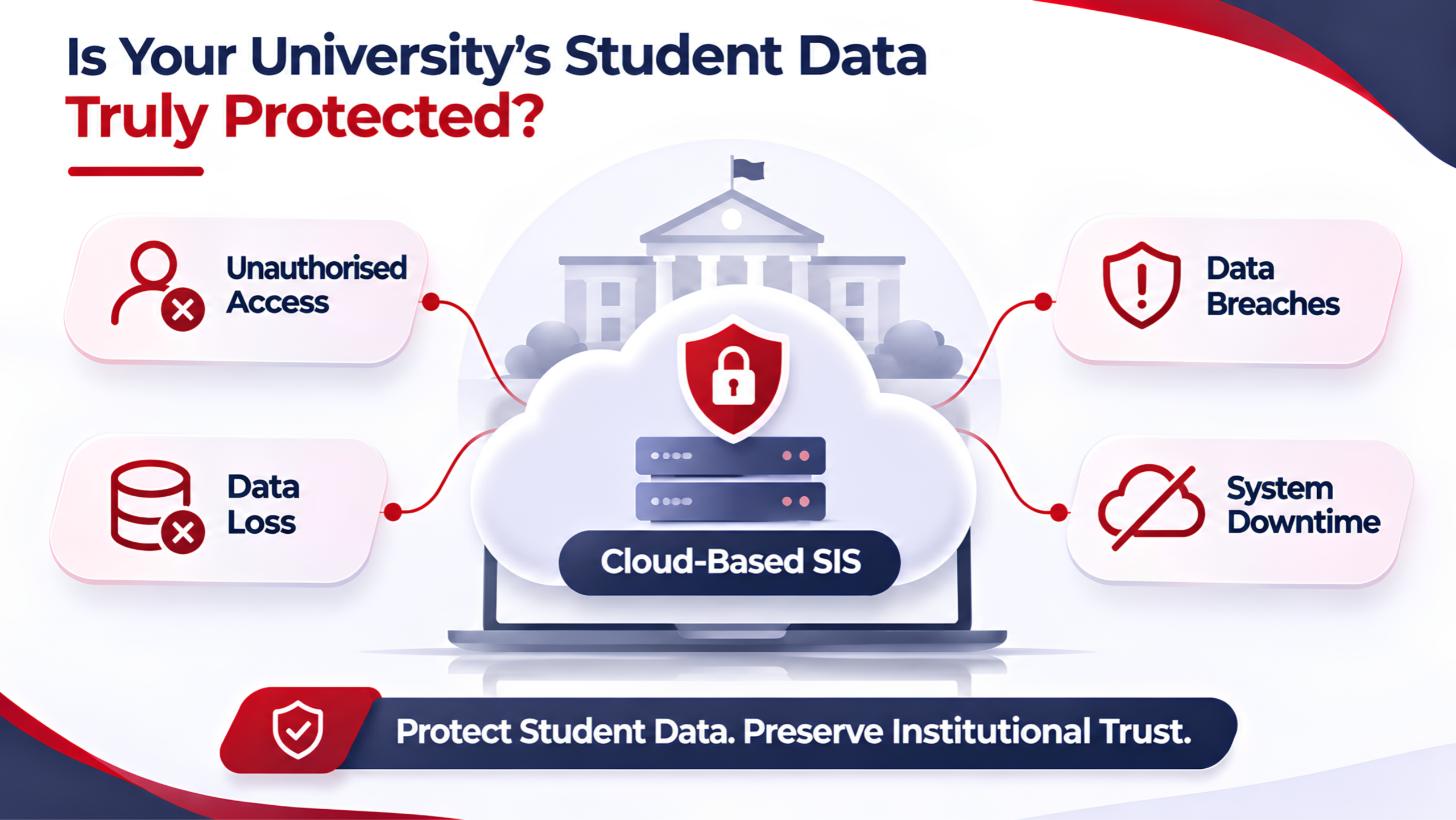
What Security Risks Do Universities Face with a Cloud-Based SIS?

1. Unauthorised Access to Student Records

Universities often have multiple user groups accessing the same SIS: admissions teams, faculty, finance staff, department heads, administrators, and students. If permissions are too broad, employees may access records unrelated to their responsibilities. Compromised accounts can also expose sensitive information.

How to address it:

  • Apply role-based access control (RBAC), so users see only the information needed for their duties.
  • Enable multi-factor authentication (MFA), especially for administrators and other privileged accounts.
  • Review user permissions regularly and revoke access when staff change roles or leave.
  • Maintain audit logs showing important access and administrative activities.

Security should be built into everyday workflows rather than treated as a one-time setup.

2. Data Breaches, Misconfiguration and Encryption Gaps

Cloud environments can be exposed through weak credentials, unpatched vulnerabilities, incorrectly configured storage, insecure integrations, or inadequate monitoring. A cloud provider’s infrastructure security cannot compensate for every weakness in an institution’s application settings and user practices.

The National Institute of Standards and Technology (NIST), in its Guidelines on Security and Privacy in Public Cloud Computing (SP 800-144), highlights the importance of evaluating security and privacy requirements when organisations outsource data, applications and infrastructure to cloud services. Its guidance covers areas such as access control, data protection, backup and recovery, incident response and continuity of operations.

For universities, this means assessing how data is protected both in transit while moving between users and systems and at rest, while stored in databases and backups.

How to address it:

  • Confirm which encryption controls are implemented and how encryption keys are managed.
  • Ask how security patches, vulnerability assessments, and configuration changes are handled.
  • Check whether security events are logged, monitored, and investigated.
  • Assess integrations with payment gateways, learning management systems, and identity providers.
  • Request relevant security documentation and independent assurance reports where available.

Security Must Extend Across the Student Data Lifecycle

A university’s security review should cover the entire student data lifecycle from admission and enrolment to academics, attendance, examinations, fees, and graduation. Connected workflows can reduce fragmented handling of records, but institutions must still define who can access each data category, why access is needed, and how long records should be retained.

When evaluating Academia by Serosoft or any SIS provider, institutions should verify how the proposed deployment supports access permissions, auditability, data handling, and administrative oversight. These capabilities should be assessed against documented requirements rather than assumed from the fact that a system is cloud-based.

3. Data Loss, Accidental Deletion and Corruption

Not every data-loss incident results from a cyberattack. A user may accidentally delete information, an application update may introduce errors, or a faulty integration may overwrite valid records. Without suitable recovery points, a university may struggle to reconstruct accurate student and financial information.

How to address it:

  • Establish backup schedules based on how frequently critical records change.
  • Define retention periods that reflect academic, operational, and legal requirements.
  • Protect backup copies with encryption and restricted administrative access.
  • Consider versioning or point-in-time recovery where appropriate.
  • Test the restoration of records and databases, not simply whether a backup job reports success.

A backup is valuable only if the institution can recover usable, accurate data within an acceptable timeframe.

How Do Cloud SIS Backups Work?

Backups create recoverable copies of data so an institution can restore information after accidental deletion, corruption, malicious activity, or infrastructure failure. However, backup frequency, retention, storage location, and access protections differ across providers and service plans.

Common approaches include:

  • Full backups: Copy a complete selected dataset or system at a particular point in time.
  • Incremental backups: Save changes made since a previous backup.
  • Snapshots and point-in-time recovery: Preserve a recoverable state or allow restoration to a defined point, depending on the platform.
  • Replicated copies: Maintain copies across systems or locations to improve availability or recovery options.

Replication and backups are not interchangeable. If corrupted or encrypted data is replicated immediately, the replicated copy may contain the same problem. Historical, protected backups can provide additional recovery options.

What Should Universities Ask About Backup Security?

Before selecting a cloud-based SIS, ask the provider:

  • How often are student records and associated databases backed up?
  • How long are backup copies retained?
  • Are backups encrypted and protected against unauthorised deletion or alteration?
  • Are backup copies isolated from the primary production environment?
  • How frequently are restoration tests performed?
  • Can the provider demonstrate recovery procedures and explain any limitations?
  • Who is responsible for backup monitoring, restoration approval, and communication during an incident?

Answers should be specific to the proposed service and documented in the contract or service-level agreement (SLA), where applicable.

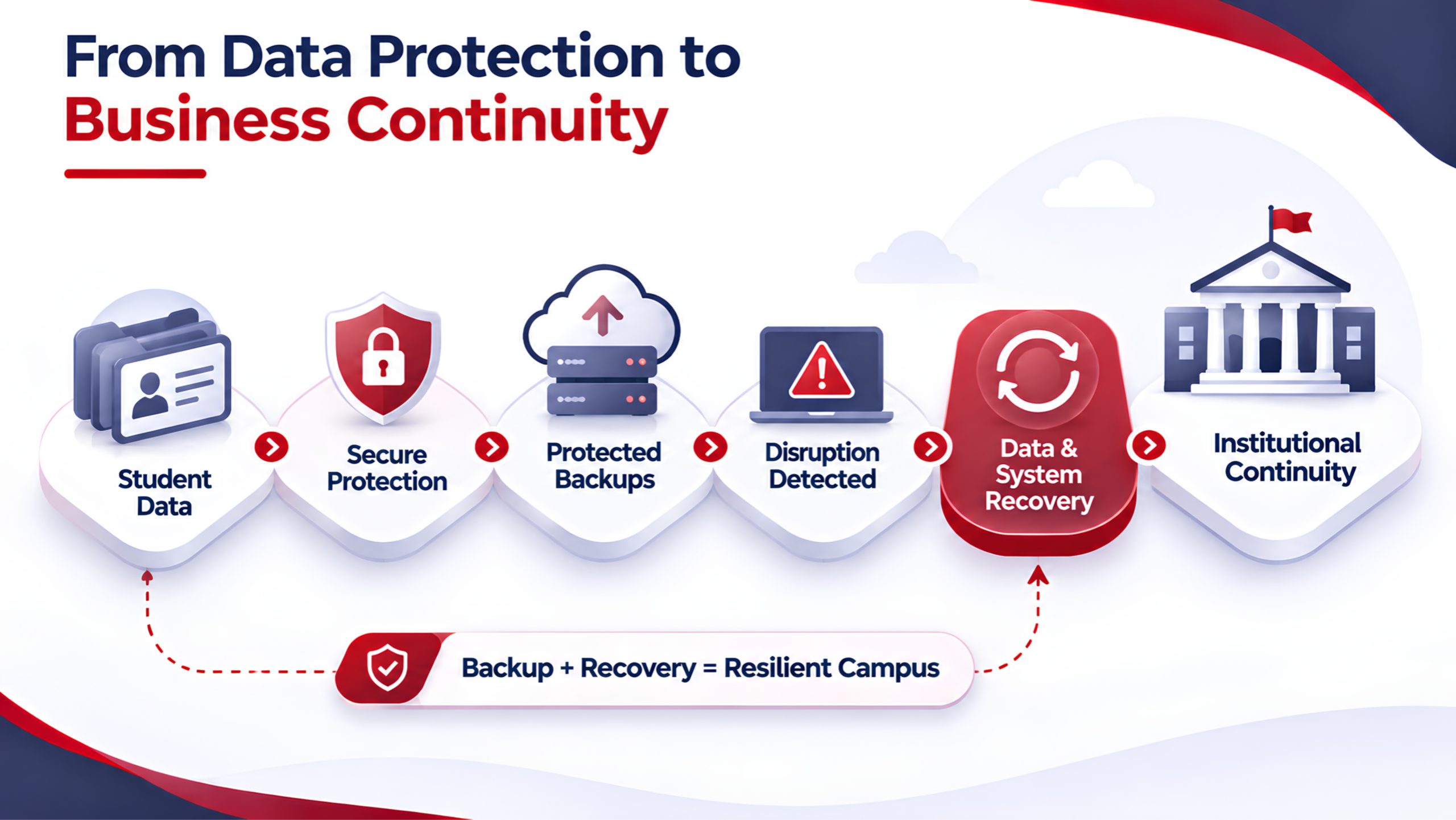
What Is Disaster Recovery, and Why Does an SIS Need It?

Disaster recovery (DR) is the planned process of restoring IT systems, applications, and data after a disruptive event. For a university, that event could be a ransomware attack, cloud infrastructure failure, accidental data corruption, a network outage, or a major service disruption.

A backup helps recover data. Disaster recovery addresses the wider challenge of restoring the systems and services needed to use that data.

Two important measures help institutions assess recovery commitments:

  • Recovery Time Objective (RTO): The target maximum time for restoring a system or service after disruption.
  • Recovery Point Objective (RPO): The maximum acceptable period of data loss, measured in time.

For example, an institution with an RPO of one hour aims to recover data with no more than one hour of changes lost. An RTO of four hours means the target is to restore the relevant service within four hours. These are illustrative targets, not universal standards or guarantees.


Data Protection

Universities should establish acceptable targets for critical SIS functions, including admissions, examinations, student records and fee processing, rather than assuming every function requires identical recovery arrangements.

4. Backups That Fail When They Are Needed

A backup strategy can still fail if copies are inaccessible, corrupted, outdated, or affected by the same incident as the production environment. Ransomware, in particular, can target accessible backup systems to prevent recovery.

The National Institute of Standards and Technology (NIST), in its Contingency Planning Guide for Federal Information Systems (SP 800-34 Rev. 1), outlines how organisations can plan for system disruptions by identifying critical operations, developing recovery strategies, and testing and maintaining contingency plans. Although the guide was developed for federal information systems, its principles are relevant to universities evaluating cloud-based SIS resilience. Institutions should establish suitable backup arrangements, document recovery procedures, and test whether critical student information and services can be restored within acceptable timeframes.

How to address it:

  • Maintain protected copies in separate locations or environments, where appropriate.
  • Use immutable or offline backup options where supported and suitable.
  • Restrict who can modify, delete, or restore backup copies.
  • Test restoration procedures regularly and document the results.
  • Define the order in which systems and services should be restored.

5. Unclear Responsibilities Between the University and Provider

One common misconception is that choosing a cloud SIS transfers every security responsibility to the vendor. In practice, responsibilities depend on the service model, deployment architecture, and contract.

A provider may manage the underlying infrastructure and certain platform controls, while the university remains responsible for matters such as staff permissions, account security, data classification, lawful processing, and appropriate use of the system.

How to address it:

Create a shared-responsibility matrix that specifies who manages access, patches, backups, incident notifications, restoration, security reviews, and regulatory obligations. Establish escalation contacts and confirm how the provider will communicate during a major outage.

Recovery Planning Should Reflect Academic Operations

A recovery plan should reflect the university’s academic calendar and operational priorities. An outage during admissions may affect application processing, while disruption during examinations may interfere with scheduling, results management, or access to records.

With 18+ years of experience in education technology, Academia by Serosoft recognises that cloud-based SIS security must extend beyond protecting data against unauthorised access. True institutional resilience depends on the ability to preserve data integrity, maintain access to critical information, and restore essential academic operations when disruptions occur. Universities should therefore assess data protection, backup reliability, and disaster recovery as interconnected pillars of a resilient digital campus. 

How Does Academia by Serosoft Fit into a Secure Cloud SIS Strategy?

Academia by Serosoft provides an AI-powered Student Information System (SIS) and Education ERP designed to support connected institutional workflows. These include admissions, enrolment, academics, attendance, examinations, fees, student services, and graduation.

A connected system can help institutions manage information through a unified operational environment. However, the security of a specific deployment must be established through evidence, including its architecture, access controls, hosting arrangements, backup policies, and recovery commitments.

When evaluating Academia for a cloud deployment, university leaders should:

  • Confirm the available access-management and authentication controls.
  • Request documentation on encryption, data storage locations, and data handling.
  • Verify backup frequency, retention, restoration procedures, and recovery targets.
  • Review applicable security assurance documentation and contractual commitments.
  • Clarify responsibilities for incident response, data export, and service continuity.
  • Assess how the deployment supports the institution’s applicable privacy and regulatory requirements.

Data Residency and Cross-Border Data Protection

Universities must understand where their student data is stored, processed, and backed up when adopting a cloud-based SIS. Data residency requirements may vary depending on the institution’s location and applicable privacy regulations. Institutions should therefore evaluate whether their cloud SIS deployment supports relevant local data residency requirements and how cross-border data transfers are managed.

When evaluating Academia by Serosoft, university leaders should verify:

  • Primary Data Location: Where are student records and institutional databases hosted?
  • Local Data Residency: Can the deployment meet applicable country-specific data localisation or residency requirements?
  • Cross-Border Transfers: How is data protected when transferred or accessed across geographical boundaries?
  • Backup Locations: In which regions are backup copies stored, and do they comply with applicable requirements?
  • Disaster Recovery Locations: Where are recovery environments maintained, and how do they align with institutional data governance policies?

Understanding these factors helps universities assess whether a cloud SIS deployment aligns with their regulatory obligations, institutional policies, and data governance requirements.

Cloud SIS Security Evaluation Checklist

Use these questions during vendor demonstrations, procurement reviews, and contract discussions.


Evaluation area What to verify
Access control Role-based permissions, MFA, and privileged-account management
Data protection Encryption, key management, and data storage locations
Monitoring Audit logs, security monitoring, and incident escalation
Backups Frequency, retention, isolation, and restoration testing
Disaster recovery Documented RTO, RPO and recovery procedures
Compliance Relevant obligations, assurance evidence and contractual terms
Business continuity Availability commitments, communication and recovery priorities

Conclusion

A cloud-based SIS can support secure and resilient university operations, but cloud hosting alone does not guarantee that student data is protected or that services can recover quickly after a disruption. Effective protection requires layered security controls, clear responsibility, secure backups, and a tested disaster recovery plan.

Universities should assess both data confidentiality and service continuity when choosing an SIS. By verifying security controls, testing restoration procedures, and agreeing on realistic recovery objectives, institutions can make more informed technology decisions and reduce avoidable disruption.

For universities comparing cloud SIS providers, the central question is not simply whether the system is hosted in the cloud. It is whether the provider can demonstrate how student data is protected, how recovery works, and what support the institution can rely on when something goes wrong.

Frequently Asked Questions

1. Is a cloud-based SIS secure for universities?

It can be, provided the deployment uses appropriate security controls, access management, encryption, monitoring, protected backups, and recovery procedures. Universities should evaluate the specific provider and configuration rather than treating cloud hosting as proof of security.

2. Is student data automatically backed up in a cloud SIS?

Not necessarily. Backup availability, frequency, retention, and coverage depend on the provider’s service and contract. Universities should confirm which data and system components are backed up and whether restoration is included.

3. What is the difference between backup and disaster recovery?

A backup is a recoverable copy of data. Disaster recovery is the broader process of restoring systems, applications, and services after disruption. A robust plan needs both suitable backups and tested recovery procedures.

4. What are RTO and RPO in a cloud-based SIS?

RTO is the target time to restore a service after an incident. RPO is the maximum acceptable period of data loss, expressed in time. Both should reflect the university’s operational priorities and be confirmed with the provider.

5. How can universities evaluate a cloud SIS provider’s security?

Review access controls, encryption, audit logs, backup arrangements, restoration tests, disaster recovery plans, incident response procedures, applicable compliance evidence, and contractual commitments. Ask for documentation that applies to the proposed deployment.

6. Does a cloud SIS provider take full responsibility for university data security?

No. Responsibilities are usually shared and vary by service model and contract. The provider and institution should clearly document who manages infrastructure security, user access, data governance, backups, incident response, and regulatory obligations.

Can an AI-Powered SIS Personalise the Student Experience? Use Cases and Limitations

Every student has different learning needs, academic goals, and expectations from their university. Yet many higher education institutions still rely on standardised communication, manual student support, and disconnected systems that make it difficult to deliver personalised experiences at scale. As student populations grow, understanding individual needs and providing timely assistance becomes increasingly challenging.

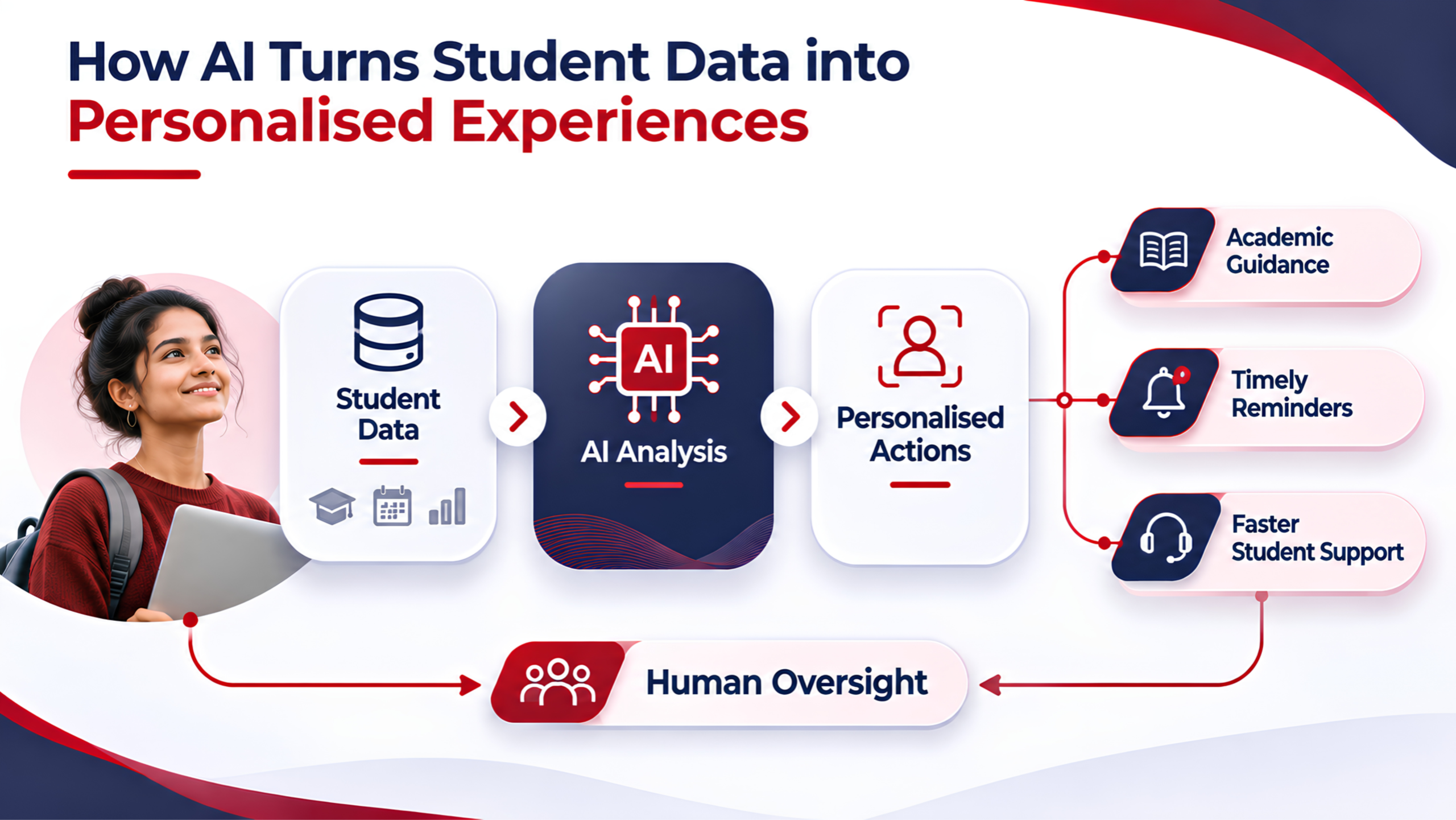
An AI-powered Student Information System (SIS) can help universities use student data more intelligently, identify potential support needs, streamline administrative interactions, and deliver more relevant information throughout the student lifecycle. From personalised academic support to predictive analytics and automated student services, AI can help institutions move beyond one-size-fits-all administration.

However, personalisation must be balanced with data privacy, fairness, transparency, and human judgement. AI can support better student experiences, but it cannot replace meaningful relationships between students, faculty, and university staff. The most effective approach combines intelligent technology with responsible institutional practices.

Key Takeaways

  • Personalise student support: Use AI and student data to deliver more relevant guidance, communication, and services.
  • Identify students who need assistance: Apply predictive analytics to flag potential academic difficulties for timely human intervention.
  • Improve administrative experiences: Automate routine queries and help students navigate university services.
  • Recognise AI’s limitations: Address privacy, bias, inaccurate recommendations, and unequal access to technology.
  • Choose an integrated SIS: Connect student information and workflows to support more consistent, data-informed experiences.

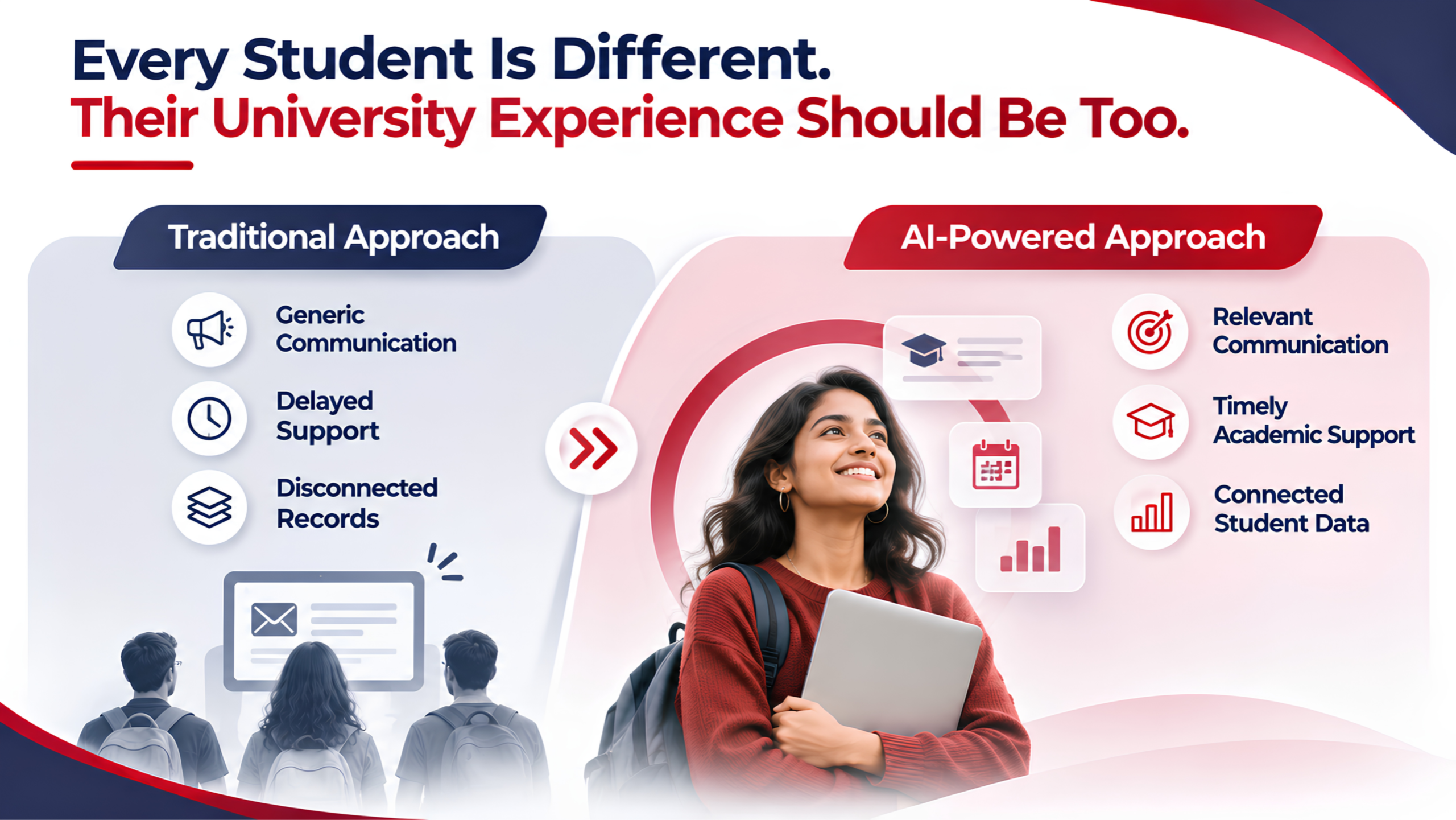
Why Are Universities Struggling to Personalise the Student Experience?

Universities collect substantial amounts of information about enrolment, attendance, academic performance, fee payments, and student engagement. However, having data does not automatically mean institutions can use it effectively.

Several challenges prevent universities from delivering personalised student experiences.

1. One-Size-Fits-All Communication

Universities often send the same reminders, announcements, and guidance to large groups of students, regardless of their academic progress or individual requirements. Students may receive irrelevant notifications while missing information that matters to them.

How AI can help: AI-supported systems can use relevant student information to deliver more contextual notifications, reminders, and guidance. For example, students approaching an enrolment deadline could receive targeted reminders rather than generic messages sent to the entire campus.


university erp

2. Limited Visibility Into Student Needs

When academic records, attendance information, and student services operate in disconnected systems, identifying students who may need additional support becomes difficult.

How AI can help: Analytics can combine relevant information to identify patterns, such as repeated absences or declining academic performance. These insights can help advisors prioritise conversations with students who may benefit from additional support.

3. Delayed Responses to Student Queries

Admissions, examinations, finance, and student services teams frequently handle repetitive questions about deadlines, application status, fee payments, and university procedures. Manual responses can create delays during peak periods.

How AI can help: AI-powered assistants can answer approved, frequently asked questions and direct students towards relevant services. Complex or sensitive queries should be escalated to the appropriate staff member.

4. Difficulty Scaling Personalised Support

One-to-one academic guidance and student counselling require time and resources. As enrolment increases, universities may struggle to maintain the same level of individual attention.

How AI can help: Automated recommendations and analytics can help staff identify relevant resources and prioritise support. However, AI should supplement, not replace academic advising, counselling, and direct communication with students.

How Can an AI-Powered SIS Personalise the Student Experience?

1. Personalised Academic Guidance

AI can analyse permitted academic information to help students identify relevant learning resources, review their progress, and understand where additional effort may be beneficial.

For example, a student struggling with a particular subject could receive recommendations for supplementary resources or be directed towards tutoring and academic support services.

Recommendations should remain explainable and relevant to the student’s goals. AI-generated guidance should not be treated as a definitive judgement of a student’s ability or potential.

2. Predictive Analytics for Early Student Support

Predictive analytics can identify patterns associated with academic difficulties or disengagement. Depending on the available data and validated models, these patterns may include repeated absences, missed assessments, or changes in academic performance.

The university can then use these insights to prioritise outreach, offer academic advising, or connect students with appropriate support services.

Based on Academia’s Industry Expertise, personalisation becomes more meaningful when universities use student information to support timely, relevant interventions rather than simply generate more reports. An SIS can provide a foundation for connecting academic and administrative information, helping institutions identify where attention may be needed. Predictive recommendations should always be validated and reviewed by authorised staff before consequential decisions are made.


student data

3. Personalised Communication and Student Services

AI can help institutions tailor communication to a student’s current stage in the student lifecycle.

Examples include:

  • Prospective applicants receiving guidance on incomplete applications.
  • Newly enrolled students receiving onboarding information and important deadlines.
  • Students approaching examination periods receiving relevant schedules and reminders.
  • Graduating students receiving information about outstanding requirements and next steps.

When connected to reliable student records and approved institutional information, AI assistants can also help students find answers without navigating multiple departmental websites.

4. More Accessible and Inclusive Learning Experiences

AI-enabled tools can support accessibility through translation, text-to-speech, speech-to-text, captioning, and alternative ways of interacting with educational content.

The 2025 EDUCAUSE Horizon Report: Teaching and Learning Edition identifies AI tools as an important development in higher education, including their potential to support personalised learning and expand access through accessibility features.

For universities serving diverse student populations across India, the UAE, South Africa, Ghana, and Malaysia, these capabilities may help address language and accessibility barriers.

However, institutions must verify that the tools work accurately across supported languages, accommodate students with different needs, and provide equivalent access to essential services.

What Are the Limitations of AI-Powered Student Personalisation?

AI personalisation can improve responsiveness, but it also introduces risks that universities must address before deployment.

1. Student Data Privacy and Consent

Personalised recommendations depend on data, but not every piece of student information should be collected or used for every purpose.

Institutions must establish legitimate purposes for data processing, restrict access to sensitive records, define retention policies, and comply with applicable privacy requirements. Students should receive clear information about how their data is used.

UNESCO’s Guidance for Generative AI in Education and Research advocates a human-centred approach to AI in education, emphasising privacy protection, ethical validation, and appropriate governance.

For universities, this means evaluating AI tools before deployment and ensuring that student information is handled securely.

2. Algorithmic Bias and Unfair Recommendations

AI models may produce biased recommendations if their training data is incomplete or reflects historical inequalities. A model could incorrectly flag students from certain backgrounds as being at higher risk or provide less relevant recommendations to underrepresented groups.

Universities should test models across student populations, monitor outcomes, investigate disparities, and provide human review and appeal mechanisms where appropriate.

3. Inaccurate or Misleading AI Responses

Generative AI can produce confident but incorrect answers. In a university environment, inaccurate information about examinations, fees, admissions, or graduation requirements can create serious confusion.

AI assistants should rely on approved institutional information, indicate uncertainty, and refer complex questions to qualified staff. Universities should also regularly review answer accuracy and update their knowledge sources.

4. Digital Inequality and Overdependence on Automation

Not all students have equal access to reliable internet connections, compatible devices, or the digital skills required to use AI tools effectively.

Universities should retain accessible non-AI alternatives, provide training, and ensure that essential services remain available to students who cannot or prefer not to use automated systems.

AI should make student support more accessible, not create another barrier.

How Academia by Serosoft Can Support a More Personalised Student Experience

Academia by Serosoft is an AI-powered Student Information System (SIS) and Education ERP designed to support connected academic and administrative operations.

By bringing student information and workflows together across admissions, enrolment, academics, attendance, examinations, fees, and student services, an integrated SIS can help institutions establish a more consistent foundation for data-informed student engagement.

Academia by Serosoft brings AI-powered capabilities into institutional reporting and analytics through SERA AI and 400+ AI-powered reports. These capabilities help institutions access and analyse institutional information, identify meaningful insights, and support more informed decision-making. By making institutional data more accessible and actionable, Academia helps universities strengthen data-driven planning and operational oversight. For institutions exploring personalised student experiences, the next step is to assess how these AI capabilities, alongside available workflow and communication features, can support individual student needs, early identification of potential challenges, and more relevant student engagement.

Academia Insights: 18+ Years of Digital Transformation Expertise. Effective student personalisation is not about automating every interaction. It is about using reliable information to make the right support available at the right time. Universities should measure outcomes such as response times, student engagement with recommended resources, support resolution rates, and the timeliness of academic interventions. These indicators can help determine whether an AI-enabled SIS is improving the student experience while preserving human oversight.

Academia can be evaluated as part of a broader digital transformation strategy in which connected student information, operational visibility, and responsible AI adoption work together. The goal is to help institutions deliver more relevant services while maintaining clear accountability for student-facing decisions.

Conclusion: Personalisation Works Best When AI and Human Support Work Together

An AI-powered SIS can help universities move beyond standardised student services by supporting personalised communication, academic guidance, predictive analytics, and more responsive administrative support. These capabilities can make it easier to identify student needs and connect individuals with relevant resources.

However, personalisation is only valuable when it is accurate, fair, secure, and accessible. Data privacy, algorithmic bias, inaccurate recommendations, and digital inequality must be addressed through responsible governance and meaningful human oversight.

For universities considering Academia by Serosoft, the priority should be to evaluate the platform’s relevant capabilities against clearly defined student experience goals. With the right implementation, institutional policies, and measurable outcomes, an AI-enabled SIS can support a more connected and student-centred university experience.

Frequently Asked Questions (FAQs)

1. Can an AI-powered SIS personalise the student experience?

Yes. Depending on its capabilities and configuration, an AI-powered SIS can support personalised communication, relevant resource recommendations, student service assistance, and data-informed academic interventions.

2. How does AI personalise learning in higher education?

AI can use relevant learning and academic information to recommend resources, identify possible learning gaps, and guide students towards appropriate support. Faculty and advisors should retain oversight of important academic decisions.

3. Can AI predict which students may be at risk of dropping out?

Predictive analytics can identify patterns associated with academic difficulty or disengagement. These predictions are not certain outcomes and should be reviewed by qualified staff before support decisions are made.

4. What are the risks of AI personalisation in universities?

Key risks include data privacy violations, biased recommendations, inaccurate AI-generated responses, excessive monitoring, and unequal access to technology.

5. How can universities use AI while protecting student privacy?

Universities should establish clear data-use policies, restrict access to sensitive information, assess AI vendors, apply appropriate security controls, and comply with applicable data protection requirements.

6. Does AI replace faculty members and academic advisors?

No. AI can support routine queries and help identify students who may need assistance, but human professionals remain essential for mentoring, complex decisions, sensitive conversations, and individual academic guidance.

7. What should universities consider when choosing an AI-powered SIS?

Institutions should evaluate integration capabilities, data quality, privacy controls, analytics, AI functionality, accessibility, explainability, human oversight, and measurable student experience outcomes. They should verify specific features and claims before implementation.

How Can Universities Protect Student Records and Control Data Access Through an SIS?

Universities manage thousands of student records containing personal details, academic transcripts, attendance histories, financial information, and identification documents. As higher education institutions adopt digital platforms, protecting this information has become a critical responsibility. Unauthorised access, compromised accounts, and disconnected databases can expose confidential records and weaken student trust.

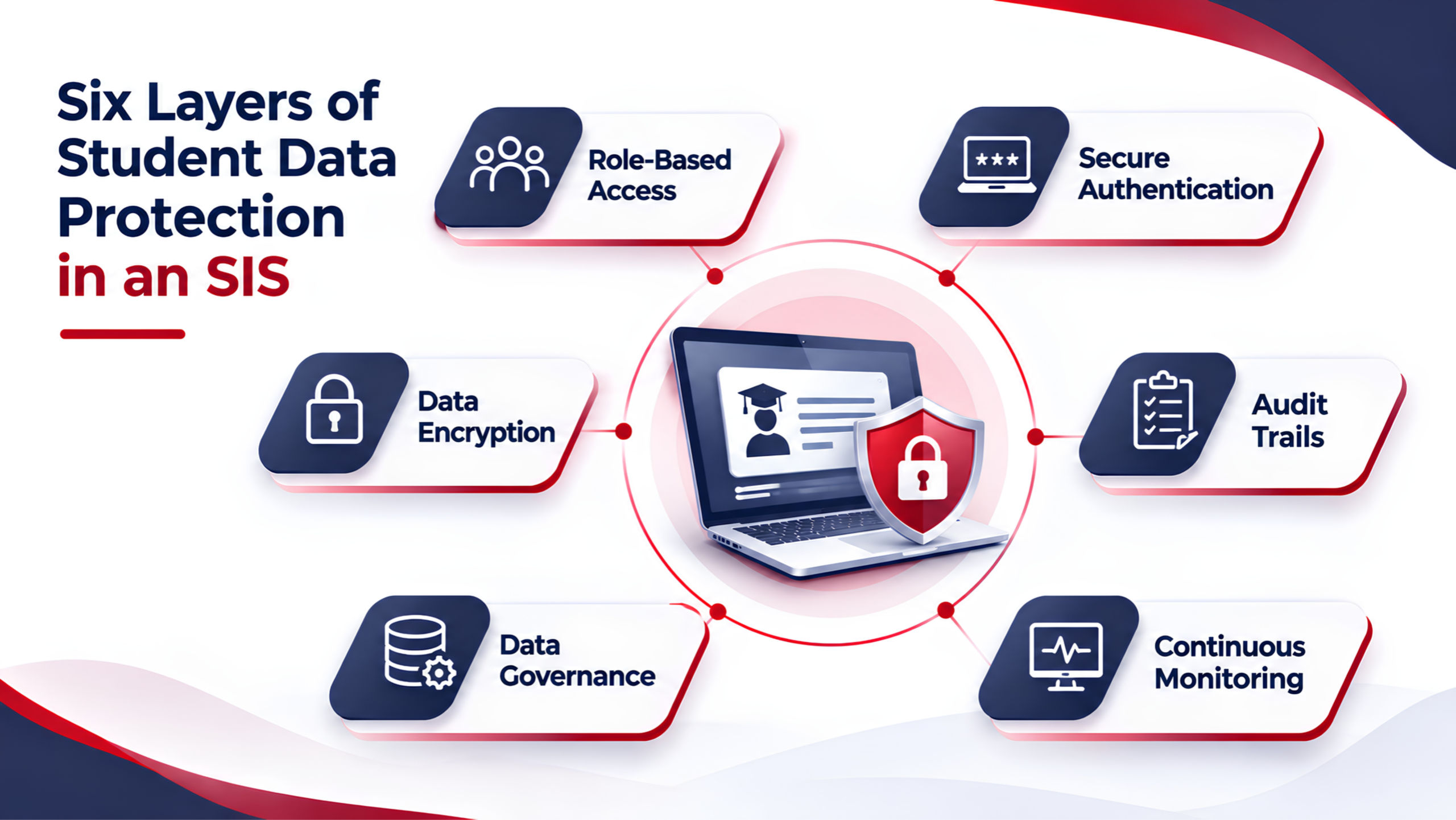
A Student Information System (SIS) helps universities centralise student information, establish access permissions, and monitor how records are used. By combining role-based access control, secure authentication, audit trails, encryption, and data governance, institutions can protect sensitive information while making administrative processes more efficient.

For universities in India, the UAE, South Africa, Ghana, Malaysia, and other higher education markets, the challenge is balancing data accessibility with confidentiality. The goal is simple: ensure that authorised people can access the information they need without exposing student records unnecessarily.

Key Takeaways

  • Restrict access to student records according to staff responsibilities.
  • Strengthen authentication, encryption, and monitoring to reduce security risks.
  • Use audit trails to improve accountability and investigate suspicious activity.
  • Apply consistent data protection policies across departments and connected systems.
  • Adopt a secure SIS to support controlled information management and administrative efficiency.

Why Is Student Data Security a Growing Challenge for Universities?

Higher education institutions operate across admissions, examinations, finance, academics, and student services. Each department requires access to different information, often across multiple systems.

When these platforms operate independently, universities may struggle to maintain consistent permissions, identify outdated accounts, and monitor who accesses sensitive records.

student data

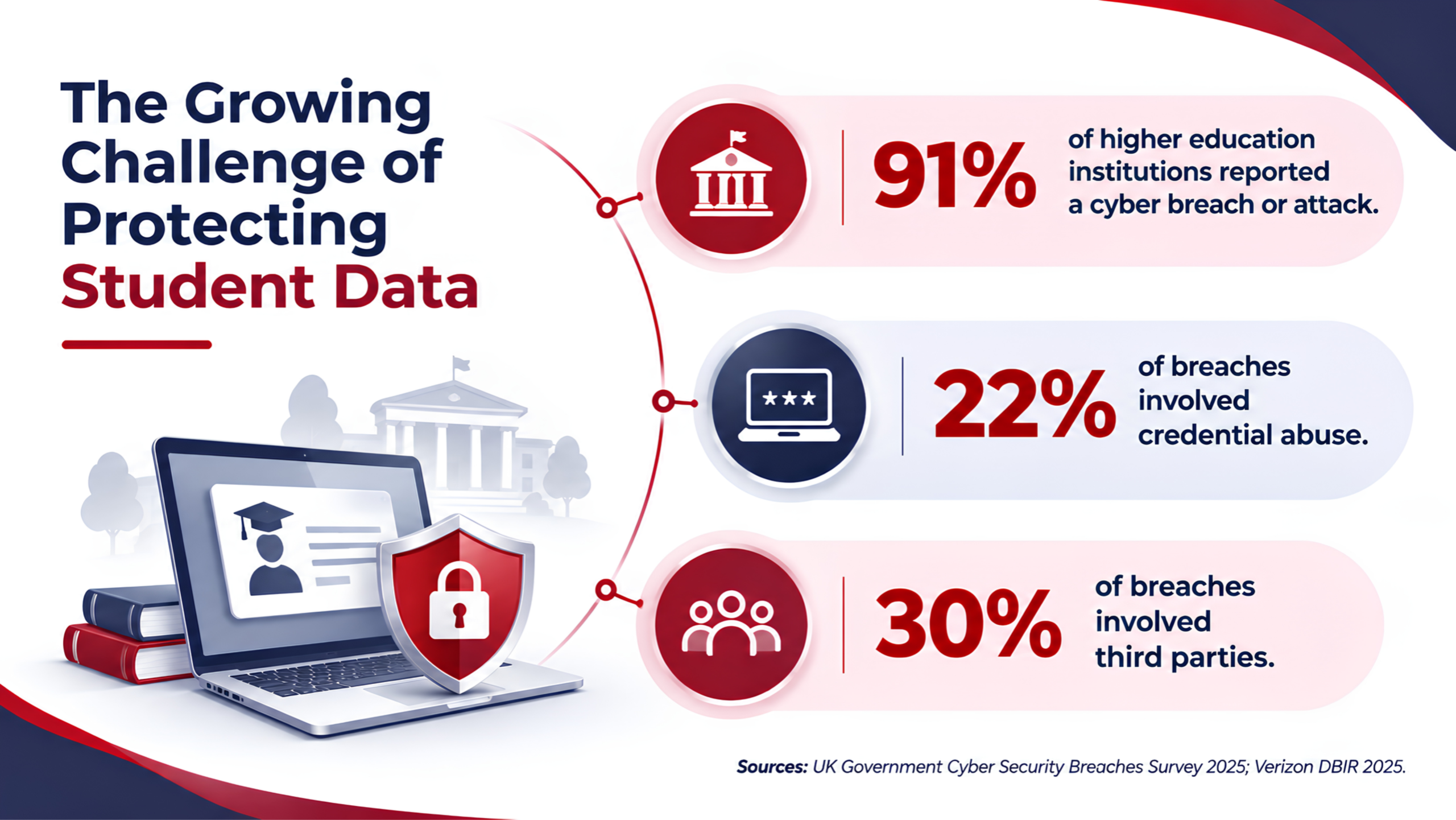
The scale of the problem is reflected in the UK Government’s Cyber Security Breaches Survey 2025. 91% of higher education institutions surveyed reported identifying a cybersecurity breach or attack in the preceding 12 months, compared with 43% of businesses overall. This finding demonstrates why cybersecurity needs to be an institutional priority rather than an isolated IT responsibility.

Five Student Data Security Challenges Universities Must Address

1. Unauthorised Access to Confidential Student Records

Not every employee needs access to every student record. However, poorly defined permissions can expose personal information to people whose roles do not require it.

For example, a lecturer may need attendance and academic performance information but should not automatically access a student’s payment details or sensitive personal documentation.

The SIS solution: A role-based access control system within an SIS helps universities assign permissions according to staff responsibilities. By providing separate access levels for faculty, finance teams, admissions staff, and administrators, an SIS helps ensure that users can view and manage only the student information relevant to their roles. 

2. Fragmented Data Across Departments

Disconnected systems often result in duplicate records, inconsistent permissions, and student information being shared through spreadsheets or email attachments. Each additional copy creates another potential exposure point.

The SIS solution: An SIS brings student information together across admissions, enrolment, academics, examinations, fees, and student services. By maintaining a unified information environment, it helps reduce duplicate records, minimise dependence on scattered spreadsheets, and support more consistent access controls across departments. 

3. Compromised Credentials and Weak Authentication

A stolen password can give an attacker access to a legitimate account, particularly when additional verification is absent.

Verizon’s 2025 Data Breach Investigations Report analysed more than 22,000 security incidents, including 12,195 confirmed breaches. It identified credential abuse in 22% of breaches and vulnerability exploitation in 20% as leading initial attack vectors.

These findings reinforce the need to secure both user identities and the systems they access.

The SIS solution: An SIS with secure authentication and identity management capabilities helps universities strengthen how users access institutional information. Features such as multi-factor authentication (MFA), secure login mechanisms, and controlled user account management can add layers of protection against unauthorised access through compromised credentials. 

4. Limited Visibility Into Data Access

Without reliable activity records, institutions may struggle to determine who viewed, modified, or downloaded confidential student information.

The solution: Built-in audit trails and activity monitoring capabilities in an SIS can help universities track user logins, student record modifications, and administrative actions. This provides administrators with greater visibility into how institutional information is accessed and modified, supporting accountability and the investigation of suspicious activity. 

5. Risks From Third-Party Applications

Universities connect student information systems with payment gateways, learning management systems, identity providers, and other applications. These connections can introduce additional security risks.

Verizon’s 2025 report found that 30% of breaches involved third parties, twice the previous year’s proportion. The finding highlights the importance of evaluating vendors and connected systems rather than focusing exclusively on the central platform.

The solution: An SIS with secure integration capabilities helps universities manage information exchanges between connected platforms, including payment gateways, learning management systems, and identity providers. Controlled integrations and permission management can help minimise unnecessary data exposure while maintaining connectivity across institutional systems. 

How Can Universities Strengthen Student Data Protection Through an SIS?

1. Establish Role-Based Access Control

RBAC ensures that users can access information relevant to their responsibilities. Universities can create separate permissions for faculty, admissions teams, finance officers, examination administrators, and IT personnel.

Permissions should follow the principle of least privilege: users receive only the access necessary to perform their work. Regular reviews help remove unnecessary privileges when responsibilities change.

2. Strengthen Authentication and Identity Management

MFA adds a verification step beyond a password, reducing reliance on a single credential. Universities should prioritise MFA for privileged accounts and access to sensitive information.

Secure single sign-on, where appropriately implemented, can simplify authentication while centralising identity management. Institutions should also promptly disable inactive accounts and revoke access when it is no longer needed.

SIS

3. Protect Records Through Encryption and Governance

Encryption helps protect student information in transit and at rest. Universities should verify how encryption keys, backups, and data transfers are managed.

Data governance is equally important. Institutions should classify information by sensitivity, collect only what is necessary, define retention periods, and securely dispose of records when permitted by applicable retention obligations.

These practices should align with relevant requirements, including India’s applicable data protection framework, the EU’s GDPR, or the US FERPA where applicable.

4. Monitor Activity and Prepare for Incidents

Audit trails provide visibility into system activity and support investigations when suspicious behaviour occurs. Universities should establish alerting procedures, maintain protected backups, conduct security assessments, and develop incident response plans.

Technology alone cannot eliminate risk. Staff training, vendor oversight, and regular reviews are necessary to make security controls effective.

Why Access Control Must Be Part of Everyday University Operations

Student data protection is not simply about preventing external attacks. Universities must also ensure that employees can access appropriate information without unnecessary exposure of confidential records.

A SIS can help institutions apply consistent permissions, reduce reliance on scattered documents, and improve visibility across student administration. The measure of success is not just how much data a university stores securely, but how effectively it controls who can use that data and for what purpose.

Academia by Serosoft provides an integrated Student Information System (SIS) and Education ERP for managing connected academic and administrative workflows. Universities evaluating Academia should assess its available access permissions, audit capabilities, authentication options, encryption practices, and integration controls against their security requirements.

How Academia by Serosoft Can Support More Efficient Student Information Management

At Academia by Serosoft, we bring student information and institutional workflows together through an integrated Student Information System (SIS) and Education ERP. From admissions and enrolment to academics, attendance, examinations, fees, and student services, our unified platform helps universities manage information more efficiently, reduce departmental silos, and establish more connected administrative processes.

Drawing on our expertise in higher education technology and experience working with institutions, we recognise that digitising institutional workflows can deliver measurable operational improvements. With Academia, universities can achieve up to 60% faster processing and 30% less administrative work. These improvements help reduce manual effort, streamline routine operations, and allow administrative teams to focus more on strategic institutional priorities.

Our experience in higher education technology has shown us that effective digital transformation goes beyond simply moving records online. It is about creating a connected information environment where institutions can manage student records more consistently, improve visibility across departments, and establish structured access to information based on organisational responsibilities.

With Academia, we aim to help universities move towards a more connected, efficient, and controlled approach to student information management, where administrative efficiency and better information governance work together to support a stronger digital campus.

Conclusion: Build a More Secure and Connected Digital Campus

Protecting student records requires a coordinated strategy that combines role-based permissions, secure authentication, encryption, monitoring, and clear data governance. The reported cybersecurity risks facing higher education make these measures increasingly important.

A SIS can help universities manage student information more consistently, control access across administrative workflows, and reduce unnecessary data duplication. However, the platform must be supported by staff training, regular access reviews, secure integrations, and an effective incident response plan.

For universities planning digital transformation, Academia by Serosoft offers an integrated environment to consider for student information and administrative management. The right approach is to evaluate its relevant security capabilities, verify performance claims, and align implementation with institutional policies and regulatory requirements.

Frequently Asked Questions

1. How does an SIS protect student records?

An SIS can support student data protection through role-based permissions, secure authentication, encryption, audit logs, and centralised information management. The actual safeguards depend on the platform and its configuration.

2. What is role-based access control in higher education?

Role-based access control assigns permissions according to job responsibilities. For example, finance personnel can access relevant fee information while faculty members access appropriate academic records.

3. Why is encryption important for university student data?

Encryption helps prevent information from being read by unauthorised parties if protected data is intercepted or accessed improperly. Universities should evaluate encryption for stored information, transfers, and backups.

4. What are the biggest student data security risks for universities?

Common risks include compromised credentials, excessive user permissions, fragmented databases, phishing, vulnerable applications, and insecure third-party integrations.

5. How can universities monitor who accesses student records?

Universities can use audit logs, access reviews, and monitoring tools to track relevant user activity, identify unusual behaviour, and investigate unauthorised access.

6. Can an SIS improve administrative efficiency as well as security?

Yes. An appropriately configured SIS can support more consistent workflows, reduce duplicate data entry, and help institutions apply access policies centrally. The outcomes depend on implementation, integrations, and institutional processes.

7. What should universities check before choosing an SIS?

Evaluate role-based access control, MFA support, encryption, audit logging, backup and recovery, data retention, vendor security, integration controls, and applicable compliance requirements. Verify capabilities and performance claims before making a decision.

What Is Education ERP? How Does It Support University-Wide Operations?

Education ERP (Enterprise Resource Planning) is becoming an essential part of modern university management. As higher education institutions manage growing student populations, multiple departments, complex academic processes, and expanding administrative requirements, disconnected systems can create operational challenges. An integrated Education ERP brings these functions together through a unified digital platform, helping universities connect information, streamline workflows, and improve coordination across departments.

From admissions and student enrolment to academic management, examinations, finance, and student services, an Education ERP creates a connected environment for managing university-wide operations. By consolidating institutional information, it also enables leadership teams to monitor performance, access meaningful reports, identify operational gaps, and make more informed decisions.

However, choosing the right Education ERP involves more than evaluating software features. Universities must consider scalability, integration capabilities, AI-powered analytics, data security, implementation support, and long-term institutional requirements to build a future-ready digital foundation.

Key Takeaways

  • Education ERP connects academic, administrative, financial, and operational processes through a unified digital platform.
  • Universities can improve coordination across admissions, enrolment, academics, examinations, finance, HR, and student services.
  • Integrated data helps institutional leaders monitor performance, identify operational gaps, and make informed decisions.
  • Choosing the right ERP requires evaluating scalability, integrations, reporting, security, and long-term institutional requirements.

What Is Education ERP?

An Education ERP (Enterprise Resource Planning) system is an integrated software platform that helps educational institutions manage academic, administrative, financial, and operational activities within a connected environment.

For universities, an education ERP brings essential functions such as admissions, student records, course registration, attendance, examinations, fee management, human resources, procurement, and institutional reporting together.

Instead of maintaining separate spreadsheets and disconnected applications, departments can access shared information and coordinate their workflows through a centralised system.

For example, when a university admits a student, the information collected during admission can flow into enrolment, academic registration, fee management, and student services. This reduces repetitive data entry and creates a more consistent student record across departments.


one education erp

In simple terms, education ERP software helps universities connect people, processes, and data to manage institution-wide operations more effectively.

Why Do Universities Need an Integrated Education ERP System?

Universities manage complex operations involving thousands of students, faculty members, administrators, finance teams, and external stakeholders. As institutions expand across programmes, departments, and campuses, managing these activities through disconnected systems becomes increasingly difficult.

Some common challenges include:

  • Fragmented student information: Admissions, examination, and finance teams may maintain separate student records.
  • Manual administrative processes: Staff spend valuable time reconciling spreadsheets, verifying documents, and preparing routine reports.
  • Limited institutional visibility: Leadership teams struggle to obtain a consistent picture of enrolments, academic performance, and financial operations.
  • Delayed decision-making: Important information remains distributed across departments, making it difficult to identify operational issues.
  • Inconsistent student experiences: Students may need to navigate multiple portals or contact different administrative offices for routine services.

These challenges make technology modernisation an institutional priority These challenges make technology modernisation an institutional priority rather than simply an IT upgrade, rather than simply an IT upgrade.

Recently, Gartner’s research on higher education technology modernisation highlights the importance of improving stakeholder experience, managing costs, and modernising core institutional systems. Areas such as student information, curriculum management, and HR are important considerations when universities evaluate technology replacement initiatives.

This reinforces the need to assess an ERP system not only by its features but also by how effectively it supports long-term institutional goals.


education erp

How Does Education ERP Support University-Wide Operations?

An education ERP supports more than student administration. Its real value comes from connecting processes that influence one another across the institution.

1. Admissions and Student Enrolment

Admissions is the starting point of the student lifecycle and one of the most important administrative functions in a university.

An education ERP can centralise application records, document submissions, eligibility checks, admission decisions, and enrolment activities. Configurable workflows help route applications to the appropriate departments and track pending actions.

Once an applicant is admitted, relevant information can flow into student records, academic registration, and fee management.

University-wide impact: Admissions, academic administration, and finance teams work with more consistent information, reducing repetitive data entry and improving application visibility.

2. Academic and Curriculum Management

Universities must coordinate programmes, courses, faculty assignments, academic calendars, classroom schedules, and student registrations.

A university ERP system helps departments manage programme structures, course offerings, timetable planning, and academic records within a shared environment.

When academic information is connected, administrators can review registrations, identify scheduling conflicts, and coordinate academic activities more effectively.

University-wide impact: Academic departments gain better visibility into programme delivery, while students and faculty can access relevant information through designated portals.

3. Attendance, Examinations and Results Management

Attendance and examination management involve multiple stakeholders, deadlines, and approval stages. Disconnected processes can make it difficult to maintain consistent academic records.

Education ERP software can support attendance recording, examination scheduling, assessment workflows, marks entry, result processing, and transcript generation.

For example, faculty members can record attendance and assessment information, while examination teams manage result processing through designated workflows.

University-wide impact: Connected academic records improve traceability, reduce administrative complexity, and support more coordinated examination processes.

4. Finance, Fees and Budget Management

Financial operations influence almost every university department. These include tuition fees, payment reconciliation, expense tracking, departmental budgets, purchasing, and financial reporting.

An education ERP can connect fee structures, student account records, and payment workflows with relevant finance processes. Depending on its configuration, it may also support budgeting, procurement, and accounting.

For instance, finance teams can reconcile student fee obligations with payment records, monitor outstanding balances, and review collection trends.

University-wide impact: Better-connected financial information supports financial oversight, reporting, and coordination between student administration and finance teams.

5. Faculty Administration

University operations depend on faculty members, administrative staff, researchers, and support teams. Managing these employees separately from institutional planning can create administrative complexity.

An education ERP with HR capabilities can support employee records, organisational structures, leave management, payroll integrations, workload allocation, and staff-related reporting.

When HR information connects with academic administration, institutions can coordinate faculty assignments and resource planning more effectively.

University-wide impact: Departments gain better administrative coordination, while leadership teams have improved visibility into workforce requirements and responsibilities.

6. Student Services and Campus Management

A university experience extends beyond lectures and examinations. Students may require hostel accommodation, transport, certificates, placement support, and other campus facilities.

An integrated ERP can connect relevant services with student records, reducing the need to repeatedly verify basic information across departments.

For example, an authorised student services team can use existing records to process requests, while hostel and transport teams maintain their operational information within the broader system.

University-wide impact: Students receive more consistent administrative support, while service teams can manage requests with clearer ownership and tracking.

7. Institutional Analytics and Leadership Reporting

University leaders need reliable information to assess enrolment patterns, academic progression, fee collections, resource utilisation and institutional performance.

An education ERP can consolidate information from connected modules into dashboards, reports and trend analyses. This enables authorised users to examine operational performance and identify areas that require attention.

The importance of this capability is reflected in the EDUCAUSE 2024 Analytics Landscape Study. The study reported that 69% of respondents considered analytics a strategic priority, while 67% viewed analytics as necessary for effective decision-making. However, 69% reported that their institution did not have a chief analytics officer.

These findings highlight a significant gap between recognising the importance of institutional analytics and having the structures needed to implement it effectively.

At Academia by Serosoft, the focus is on helping institutions move beyond fragmented information towards connected institutional intelligence. When data from admissions, academics, examinations, fees, and student services is connected, university leaders have a stronger foundation for monitoring performance and identifying operational bottlenecks.

University-wide impact: Decision-makers gain a more consistent institutional view, helping them move from retrospective reporting towards informed operational planning.

How Does Education ERP Improve University Operational Efficiency?

The value of education ERP software goes beyond digitising existing administrative processes. Its real contribution lies in improving how different departments coordinate their work.

A well-implemented system can deliver improvements across several operational areas.


Operational area Potential improvement KPI to measure
Admissions Reduced repetitive administrative work Application processing time
Finance Better payment visibility Fee reconciliation time
Academics More coordinated workflows Result publication turnaround
Student services Clearer request ownership Service resolution time
Reporting Reduced manual data consolidation Management report preparation time
Administration Improved record consistency Data-quality exceptions

From Academia by Serosoft’s expertise, universities should measure ERP success through actual operational outcomes rather than the number of modules implemented or reports generated.

For example, an institution can establish baseline measurements for application processing, fee reconciliation, and examination result publication before implementation. The same indicators can then be tracked after deployment to understand the improvements achieved.

This outcome-based approach helps universities demonstrate the practical value of digital transformation without relying on generic efficiency percentages that may not reflect their institutional realities.

What Does a Future-Ready Education ERP Look Like?

University technology requirements continue to evolve. Institutions need systems that can accommodate changing student expectations, growing data volumes, new academic models, and increasingly connected campus environments.

A future-ready education ERP should offer the following capabilities:

  • Cloud-based accessibility: Support authorised access across departments and campuses while reducing dependence on institution-managed infrastructure.
  • AI-powered analytics: Help institutions interpret institutional information, identify patterns, and generate actionable insights.
  • Seamless integrations: Connect with learning management systems, payment gateways, accounting applications, identity management platforms, and other essential technologies.
  • Scalable architecture: Accommodate additional programmes, campuses, student populations, and institutional requirements.
  • Strong data governance: Support role-based access, audit trails, security controls, and relevant data protection requirements.
  • Configurable workflows: Allow universities to adapt processes to their academic structures, administrative policies, and regional requirements.

Academia by Serosoft’s education ERP platform brings together student lifecycle management, institutional operations, and AI-powered capabilities to support connected campus environments. Its approach focuses on making institutional information more accessible and useful for the people responsible for university operations.

For universities in India, this may involve supporting complex admissions, fee structures, and academic administration. Institutions in the UAE may prioritise multi-campus operations and regional compliance, while universities in South Africa and Ghana may place greater emphasis on institutional reporting, scalability, and integration with existing systems.

The right solution should address these requirements without creating unnecessary technological complexity.

How Should Universities Choose the Right Education ERP Software?

Selecting an education ERP is a long-term institutional decision. Universities should evaluate potential platforms against their operational requirements rather than focusing exclusively on software demonstrations.

Consider these factors before making a decision:

  • Functional coverage: Does the platform support the institution’s academic, administrative, and financial workflows?
  • Integration capabilities: Can it exchange information reliably with existing systems?
  • Scalability: Can it accommodate future programmes, campuses and student volumes?
  • Reporting and analytics: Can authorised users access meaningful institutional insights?
  • Security and compliance: Does it support appropriate access controls, audit trails and data protection requirements?
  • Implementation support: Does the vendor provide data migration, staff training and ongoing technical assistance?
  • Total cost of ownership: Have licensing, implementation, integration, training and maintenance costs been considered?

Universities should also request product demonstrations based on real institutional scenarios, such as processing an admission, managing an examination cycle, or reconciling student fee payments.

This makes it easier to understand how the platform will perform in everyday university operations.

Conclusion

An education ERP helps universities move from fragmented departmental processes towards a connected model of institutional management.

By integrating admissions, academics, examinations, finance, HR, student services, and institutional analytics, it creates a stronger foundation for operational coordination, data visibility, and informed decision-making.

For institutions evaluating education ERP software, the first step is to identify existing operational gaps and assess how an integrated platform can address them.

Academia by Serosoft provides education ERP and student information system solutions designed to support connected university operations. Explore Academia’s solutions to understand how your institution can build a more integrated, intelligent, and efficient campus ecosystem.

Frequently Asked Questions About Education ERP

1. What is an education ERP system?

An education ERP is integrated software that helps educational institutions manage academic, administrative, financial, and operational activities through connected modules and shared information.

2. How does an education ERP support university operations?

It connects processes such as admissions, enrolment, academics, examinations, fees, HR, student services, and institutional reporting, helping departments coordinate work and improve institutional visibility.

3. What are the main benefits of university ERP software?

Key benefits include reduced repetitive data entry, improved record consistency, more coordinated workflows, better financial oversight, and accessible institutional reporting. Actual outcomes depend on implementation and user adoption.

4. Can education ERP software support multiple university campuses?

Yes. Depending on its architecture and configuration, an education ERP can support multiple campuses, departments, programmes, and administrative structures through a connected platform.

5. Is cloud-based education ERP suitable for universities?

Cloud-based ERP can support access across campuses and reduce the need for institutions to manage underlying infrastructure. Universities should still evaluate data security, residency, availability, integrations, and backup requirements.

6. How can universities measure education ERP implementation success?

Institutions can monitor application processing time, fee reconciliation, examination result turnaround, service-request resolution, and management reporting time. Establishing baseline measurements before implementation is essential.

7. How long does it take to implement an education ERP?

Implementation timelines depend on institutional size, data migration, integrations, customisation, and change management. Universities should request a phased implementation roadmap with defined milestones and testing requirements.


Mobile Access in Student Information Systems: Key Features and Benefits

Students may need to check their examination results between classes, submit assignments while travelling, or confirm fee payments outside office hours. Faculty members need access to class lists and attendance records, while administrators must respond to requests without being tied to their desks. These everyday requirements highlight why mobile access has become an important capability in modern higher education.

A mobile-enabled Student Information System (SIS) allows students, faculty, and authorised administrative staff to access relevant academic information and institutional services through smartphones and tablets. Rather than depending entirely on desktop computers or physical administrative offices, users can complete supported tasks through mobile applications or responsive web portals.

However, effective mobile access involves more than adapting a website to a smaller screen. Universities need connected student services, timely notifications, secure access, intuitive interfaces, and, increasingly, AI-powered assistance. Features such as SERA AI, Academia by Serosoft’s AI assistant, illustrate how mobile access can evolve from simply viewing information to making institutional services easier to navigate.

Understanding these features helps universities evaluate how mobile-enabled SIS platforms can improve accessibility, streamline routine interactions, and create a more connected campus experience.

Why Is Mobile Access Important in Higher Education?

Smartphones have become a familiar way to access digital information. According to Pew Research Center’s Mobile Fact Sheet, updated in November 2025, 91% of U.S. adults owned a smartphone in 2025. Although this figure does not specifically represent university students or global smartphone adoption, it demonstrates how widely mobile devices are used.

For universities, this creates an opportunity to make essential academic and administrative services accessible beyond traditional desktop environments.

Students can check timetable changes, monitor attendance, access examination schedules, and review fee dues without visiting multiple departments. Faculty can access class information and supported teaching workflows while moving between classrooms. Administrative teams can review requests and consult relevant records according to their access permissions.

Mobile access can also reduce unnecessary enquiries by allowing users to find information independently. Its effectiveness, however, depends on whether the SIS provides reliable data, usable interfaces and the right functionality for each user group.

Key Features of a Mobile-Enabled Student Information System

1. Centralised Access to Academic Information

One of the most valuable mobile SIS features is the ability to access academic information from a single digital environment.

Students may need to review attendance records, examination schedules, published results, course details and academic calendars throughout the semester. A mobile-accessible SIS brings these services closer to students, reducing their dependence on separate portals or in-person enquiries.

Faculty members can also access relevant class lists, attendance information and academic records where supported. This makes routine information easier to retrieve while helping authorised users work with institutional records.

The benefit is not simply convenience. When academic information is organised within a connected system, students and staff have a clearer view of relevant information and the next steps required.

2. Mobile Student Portals and Self-Service Features

A student portal or dedicated mobile application can bring multiple academic and administrative services together.

Depending on the institution’s configuration, students may be able to:

  • View daily, weekly, and monthly class schedules.
  • Check attendance records and examination results.
  • Access assignments and submit academic work.
  • Review outstanding fees and complete supported payments.
  • Download hall tickets and view placement information.
  • Submit service requests and receive institutional updates.

For example, Academia by Serosoft’s Student Portal and App lists features such as attendance and dues tracking, assignment submissions, examination schedules, results, notifications, and mobile fee payments.


Mobile Student Information System

These self-service capabilities can make routine interactions easier for students while reducing avoidable administrative follow-ups. Universities should assess which features are available in their chosen deployment and how they integrate with existing institutional processes.

3. Real-Time Notifications and Institutional Communication

Students and staff need timely information about registration deadlines, examination schedules, classroom changes, fee due dates, and institutional announcements.

Mobile SIS applications can deliver relevant notifications through supported in-app alerts, push notifications, or other integrated communication channels. These updates help users respond to changes without repeatedly checking different portals.

For instance, a student could receive a notification about an upcoming registration deadline and open the application to review the relevant information. Faculty members could receive schedule updates, while authorised staff could monitor relevant requests.

The value of notifications depends on their relevance, accuracy, and timing. Universities should avoid excessive alerts and ensure that sensitive academic or financial information is not exposed through unsecured notifications.

4. SERA AI: Bringing Intelligent Assistance to Mobile Access

Mobile access becomes more useful when students and staff can find information without navigating multiple screens. AI-powered assistants can add a conversational layer to the digital experience.

Academia by Serosoft’s SERA, described in its published SERA AI assistant article, is a voice-based assistant designed to work across Academia ERP, including its mobile application. The article describes natural-language voice commands that help users retrieve information and perform supported tasks.

For example, a student could ask for a timetable instead of manually navigating through multiple menus. The published article also describes access to personalised reports and academic information, while outlining administrative use cases such as accessing student records, attendance, and reports.

These capabilities illustrate three potential benefits of AI-enhanced mobile access:

Simpler information discovery: Conversational or voice-based interaction can make supported information easier to find.

More accessible assistance: AI assistance can help users obtain answers to routine questions without always relying on direct staff intervention.

More convenient workflows: Where supported, AI-enabled access to information and administrative functions can reduce the steps required for everyday tasks.

SERA should be understood as a complement to the wider SIS, not a replacement for institutional processes or human support. Universities should verify currently available features, permissions, and mobile compatibility with the provider before implementation.

5. Mobile Access for Faculty and Administrative Teams

Mobile SIS functionality is not limited to students. Faculty and administrative teams also need timely access to institutional information.

Faculty members may use supported mobile features to review class lists, record attendance, and consult relevant student records. Administrative staff may need to check request statuses, review applications, or access selected information while away from their desks.

These capabilities can improve operational flexibility, particularly across institutions with multiple departments, buildings, or campuses.

However, not every task is suited to a mobile interface. Complex reporting, detailed data analysis, and extensive academic administration may still require a desktop environment. A well-designed SIS should provide an appropriate experience across devices rather than forcing every workflow onto a smartphone.

6. Secure, Accessible and Reliable Mobile Experiences

Convenience must not compromise the privacy of student information. Mobile SIS platforms handle sensitive academic, personal and financial records, making security essential.

Universities should evaluate secure authentication, role-based permissions, encryption, session management and appropriate controls for sensitive information. They should also test performance across supported devices, browsers and network conditions.

Accessibility is equally important. Readable text, sufficient contrast, clear navigation, and compatibility with assistive technologies help make mobile services usable by a wider range of students and staff.

Institutions should also consider users with limited connectivity, older devices, or accessibility requirements. Mobile access should expand the ways users can reach essential services, not become the only available channel.

What Do Higher Education Reports Tell Us About Mobile Access?

Two external research sources help explain why universities should consider mobile accessibility as part of their wider digital strategy.

EDUCAUSE’s 2024 Students and Technology Survey examines students’ experiences with educational technology. Its survey includes an all-in-one mobile app for accessing institutional services and resources among the technology features considered.

The inclusion of this capability highlights the relevance of integrated mobile services when institutions assess the student technology experience. Universities should evaluate whether their mobile SIS brings essential services together in a convenient and accessible way.

Pew Research Centre: Mobile Fact Sheet, November 2025

Pew Research Centre reported that 91% of U.S. adults owned smartphones in 2025. While this is not a higher education adoption statistic, it provides useful context for the widespread availability of mobile devices.

Together, these sources support a practical conclusion: universities should assess mobile access as part of the overall student experience, while using institution-specific evidence to determine which features students and staff need most.

What Does Implementation Look Like?

Academia by Serosoft’s published resources offer two useful perspectives on connecting digital access with institutional operations.

Mobile Access and Digital Student Services

In its Student Portal and App overview, Academia describes a range of mobile and portal capabilities, including attendance tracking, fee management, assignments, schedules, results, and notifications.

This demonstrates how mobile access can be part of a broader self-service strategy rather than a standalone application. Universities can evaluate these capabilities against their own requirements, identifying which interactions should be available remotely and which require additional verification or staff involvement.

Case study: IIIT Bangalore’s Digital Transformation

Academia’s IIIT Bangalore case study documents the institution’s digitalisation of admissions, payments, application workflows, course registration, and transcript generation. Its Student Portal and Mobile App supported course registration.


Campus ERP

The published case study reports three notable results:

  • 3,000 applications processed in a short span.
  • 80% of payments shifted to online mode.
  • 12.3% time saved in application processing.

These metrics are based on Academia’s published internal assessment. They reflect broader digital transformation outcomes and should not be attributed to mobile access alone.

The case nevertheless illustrates how mobile access can form part of a connected digital environment in which students can interact with institutional services more conveniently.

How Can Universities Implement Mobile SIS Access Successfully?

A successful implementation starts with user needs rather than technology alone.

First, identify the activities students, faculty, and administrators need to complete on mobile devices. Prioritise frequently used services such as checking schedules, reviewing results, tracking requests, and receiving important updates.

Next, evaluate whether the SIS supports these workflows through a responsive portal, dedicated mobile application, or both. Institutions should also confirm integrations, security requirements, and compatibility with their existing systems.

Pilot the experience with representative users before wider deployment. Measure adoption, task completion, user satisfaction, application performance and routine support enquiries. These indicators can help institutions determine whether mobile access is improving the experience and where further improvements are needed.

Conclusion

Mobile access in a Student Information System is about making essential academic information and institutional services easier to reach. From student self-service portals and real-time notifications to faculty workflows and AI-powered assistance through SERA, mobile capabilities can support a more connected higher education experience.

For universities, the priority should be to choose a mobile-enabled SIS that combines useful features, secure access, reliable data, and accessible design. With the right implementation, mobile access can complement institutional operations, reduce friction in everyday interactions, and help students and staff engage with campus services more conveniently.

Frequently Asked Questions

  • What is mobile access in a Student Information System?

    Mobile access allows students, faculty and authorised staff to use supported SIS features through smartphones and tablets, via a responsive website or mobile application.

  • What features should a mobile SIS include?

    Useful features include academic records, timetables, attendance, examination results, fee management, notifications, assignment access and student self-service functions.

  • How does SERA AI support mobile SIS access?

    Academia’s published SERA article describes voice-based interaction within its ERP, including mobile access to supported information such as timetables, attendance and reports. Available capabilities should be confirmed with the provider.

  • How does mobile SIS access benefit universities?

    It can make information easier to access, support self-service, improve communication and help authorised staff manage selected workflows without relying exclusively on desktop computers.

  • How can universities measure mobile SIS effectiveness?

    Institutions can monitor adoption, task completion, user satisfaction, support enquiries, performance, and accessibility feedback to evaluate whether mobile access meets user needs.

How Does a Student Information System Improve Data Visibility Across Departments?

A Student Information System (SIS) plays a critical role in helping universities manage student data, maintain consistent institutional records, and improve visibility across departments. When admissions, academics, examinations, finance, and student services operate with disconnected information, institutions can struggle to produce reliable reports, reconcile conflicting figures, and obtain a complete view of student progress and administrative performance. Effective data visibility therefore requires more than access to information; it depends on how accurately data is maintained, how consistently it moves across institutional functions, and how effectively it supports reporting and decision-making.

With a Student Information System, authorised staff can access relevant, up-to-date information according to their responsibilities. Instead of relying entirely on spreadsheets, email exchanges, and manually consolidated reports, departments can coordinate activities using shared records and structured workflows. This improves the visibility of pending tasks, student progress, administrative requirements, and operational bottlenecks.

For higher education institutions managing complex programmes and growing volumes of student information, better visibility is not simply about making more data available. It is about ensuring that the right people can access reliable information, understand what requires attention, and make informed decisions while maintaining appropriate privacy and access controls.

Why Do Universities Need Better Data Visibility Across Departments?

Universities generate student information throughout the student lifecycle, from enquiries and applications to enrolment, academics, examinations, fee payments, and graduation. However, when this information is maintained in separate systems, departments may have different views of the same student.

For example, an admissions team may have recorded that a student completed registration, while the academic department is still waiting for confirmation. Similarly, finance may have information about outstanding fees that academic administrators cannot readily access when reviewing an administrative query.

These gaps do not necessarily mean that information is missing. Often, it exists but is difficult to access, verify, or interpret across departments.

The challenge is increasingly recognised across higher education. EDUCAUSE’s 2025 QuickPoll on data modernisation and management identified siloed data across departments as a challenge for 51% of respondents working on data strategy. The findings illustrate how fragmented information can complicate institutional efforts to improve reporting and decision-making.

Universities need a dependable way to connect relevant information without removing departmental accountability. An SIS can support this by providing a shared foundation for student records, controlled access, and coordinated processes.

With 18 years of experience in education technology, Academia by Serosoft understands that institutional data visibility depends on more than bringing information together. Universities need consistent student records, clearly defined data ownership, and coordinated processes that help departments work with reliable information. Without these foundations, fragmented data can lead to conflicting reports, duplicated effort, and limited visibility into institutional operations. A well-structured approach to student data management helps institutions establish greater consistency across the student lifecycle and build a stronger foundation for institutional reporting.

How Does an SIS Create a Unified View of Student Information?

An SIS can help establish a consistent student record that authorised departments reference throughout the student lifecycle.

When a student applies for admission, the institution collects relevant personal details, qualifications, programme preferences, and supporting documents. After admission, selected information can be used in enrolment and academic administration, subject to the institution’s configured workflows and approval requirements.

As the student progresses, additional information is generated through course registration, attendance, examinations, fee administration, and student service requests. When these processes are connected appropriately, authorised staff can access relevant information without repeatedly requesting the same details from other departments.

Consider a student who wants to register for a course but encounters an administrative restriction. Resolving the issue may require checking programme eligibility, prerequisite completion, or an outstanding requirement. An SIS can help staff identify the relevant information and determine which department must take the next action.

The objective is not necessarily to place every institutional record in one database. Universities may retain specialised applications for finance, learning management, or other functions. What matters is whether the required information can be exchanged reliably and presented consistently.

A unified view therefore depends on accurate records, compatible integrations, common definitions, and clearly assigned responsibility for maintaining data. From a data management perspective, a unified student record is only one part of the solution. Universities must also establish consistent definitions for student statuses, programme details, enrolment records, and academic outcomes so that departments interpret information in the same way. Academia by Serosoft’s higher education technology experience reinforces the importance of connecting data management with institutional workflows. When information is maintained consistently and exchanged appropriately across systems, universities have a stronger foundation for dependable reporting and a more coherent view of student activity.

How Does an SIS Improve Visibility for Different University Departments?

Different departments need different information to perform their responsibilities. An SIS can improve coordination by making relevant student information visible across these operational areas.


Department Data visibility requirement Potential operational benefit
Admissions Application status, documents, offers, and enrolment requirements Clearer admission-to-enrolment handovers
Academic administration Programme details, course registration, and academic records Better visibility into student academic status
Examinations Examination registration, schedules, and results More coordinated examination administration
Finance Fee records, payments, and outstanding balances Clearer visibility into relevant financial requirements
Student services Requests, case status, and responsible departments More informed responses to student queries
Institutional leadership Enrolment trends, operational reports, and student progress indicators Better-informed planning and oversight


The wider value of departmental data visibility lies in creating a more consistent institutional picture. When relevant information is maintained across connected functions, authorised teams can examine student records in context, understand where actions remain pending, and coordinate responses without relying entirely on separate spreadsheets or repeated manual updates. This also supports more consistent institutional reporting by reducing the risk of departments working with different versions of the same information. The extent of this visibility depends on system configuration, integration capabilities, data quality, and role-based access permissions.

The precise information available will depend on the SIS configuration, integrations, institutional policies, and access permissions.

For example, academic administrators may need to verify registration status, while student services staff may need to understand whether a student’s request is awaiting approval. Leadership teams may require aggregated reporting to assess enrolment patterns or identify recurring administrative delays.


Campus Management System

Visibility does not mean unrestricted access. Each department should see the information required for its responsibilities, with sensitive records protected through appropriate permissions and controls.

Can Better Data Visibility Help Universities Make Decisions Faster?

Yes. When information is reliable and accessible, staff can spend less time collecting updates from different departments and more time interpreting information and resolving issues.

Without connected data, preparing an enrolment report may require teams to extract records from several systems, reconcile conflicting figures, and confirm whether the information is current. By the time the report is ready, the underlying situation may have changed.

An SIS can support more consistent reporting by using shared records and standardised processes. Depending on the platform’s capabilities, administrators may be able to review student status, identify incomplete tasks, and examine operational trends through reports or dashboards.

Gartner’s June 2026 Market Overview for Higher Education Analytics Platforms describes how higher education analytics platforms are evolving to support decision-making across areas such as enrolment, finance, and student success. This reinforces the importance of connecting institutional information with practical decision-making needs.


For example, university leaders may use available reporting to examine enrolment patterns, compare programme-level figures, or identify departments experiencing recurring processing delays. These insights can support investigation and planning, although the quality of the conclusions depends on the underlying data and reporting methods.

An SIS does not automatically make every decision faster. Institutions must also establish clear approval processes, define ownership, and ensure staff understand how to interpret the information available to them.


Data Visibility

How Can an SIS Help Identify Student Issues Earlier?

Data visibility can help institutions recognise potential issues before they become more difficult to resolve.

When relevant information is distributed across separate systems, warning signs may remain unnoticed. A student could have an incomplete registration requirement, a missing document, an unresolved service request, or an academic concern that requires attention from more than one department.

An SIS can make selected indicators more accessible to authorised staff. Depending on available functionality, reporting and analytics may help identify outstanding tasks, changes in academic progress, or recurring administrative problems.

Effective reporting can help universities make these indicators easier to identify and investigate. By reviewing relevant student records, outstanding requirements, and available academic or administrative information together, authorised staff can establish where follow-up may be needed. At an institutional level, recurring patterns may also reveal process bottlenecks or areas where data maintenance needs improvement. Such insights are useful only when institutions can trust the information being reviewed and distinguish between an initial indicator and a confirmed underlying issue.

For instance, if a student’s programme change has been approved but the relevant academic record has not been updated, a coordinated workflow can help make the pending action visible. Staff can investigate the discrepancy and correct the record before it creates further administrative complications.

Institutions should distinguish between identifying an indicator and establishing the reason behind it. A missed assessment or incomplete record does not necessarily indicate a student is at risk. Staff need appropriate context and established procedures before deciding what action to take.

The value of visibility lies in enabling timely, informed follow-up—not making assumptions based on isolated data points.

What Role Do Data Quality and Governance Play in an SIS?

Connected information is useful only when people can trust it. If departments use different definitions, maintain duplicate student profiles, or fail to update records consistently, a connected system may distribute inaccurate information more efficiently rather than solve the underlying problem.

Universities should establish clear data governance practices covering ownership, definitions, validation, access, retention, and correction procedures.

EDUCAUSE’s guidance on getting started with data governance explains that governance helps institutions understand what data they hold, where it is stored, who can access it, and whether it meets appropriate quality standards. It also connects data management with privacy, security, and trust in institutional decision-making.

For higher education institutions, effective data management requires more than centralising information. It demands a structured approach to maintaining data accuracy, standardising information across departments, managing changes to student records, and ensuring that reports reflect consistent definitions. Academia by Serosoft understands the importance of connecting data management with everyday institutional workflows. When evaluating an SIS, universities should look beyond data storage to assess how the system supports information consistency, accountability, reporting requirements, and controlled access throughout the student lifecycle.

Practical measures include:

  • Define data ownership: Assign responsibility for maintaining and correcting each category of information.
  • Standardise definitions: Ensure departments interpret key terms, statuses, and reporting measures consistently.
  • Validate records: Establish processes for identifying duplicate profiles, missing fields, and conflicting information.
  • Control access: Give staff permissions appropriate to their roles and responsibilities.
  • Maintain accountability: Track important changes and approvals where supported by the system.
  • Review data regularly: Check whether records and reports remain accurate, relevant, and complete.

Academia by Serosoft’s higher education technology perspective emphasises evaluating data visibility alongside workflow design, access controls, and institutional reporting requirements. The goal is to make information more dependable and actionable while preserving the safeguards needed to manage student records responsibly.

What Should Universities Evaluate Before Implementing an SIS for Better Data Visibility?

Before selecting or configuring an SIS, universities should identify where information gaps occur and determine which departments need to exchange data.

A practical assessment should cover the following areas:


Area to assess Questions to ask
Existing systems Where is student information currently stored?
Data integration Can relevant records be exchanged with existing applications?
Reporting Can authorised users access consistent, useful reports?
Data quality How are duplicate or conflicting records identified and resolved?
Access and security Can permissions be configured according to staff responsibilities?
Workflow visibility Can teams identify pending approvals and outstanding actions?
Accountability Are data ownership and change-management responsibilities clear?
Staff readiness Are users trained to interpret and maintain information correctly?

Universities should also test realistic scenarios during vendor evaluations. Ask the provider to demonstrate how an admissions update reaches academic administration, how a pending student request is tracked, and how discrepancies between connected systems are handled.

These scenarios help establish whether the proposed solution supports the institution’s actual processes rather than simply presenting information on a dashboard.

How Academia SIS Supports Institutional Data Management, Reporting, and Visibility

With 18 years of experience in education technology, Academia by Serosoft understands the data management and reporting requirements of higher education institutions. Academia SIS supports key areas of university management, including admissions, academic management, examinations, student services, portals, and reporting. These functional areas provide a foundation for institutions seeking to coordinate student information, improve departmental visibility, and manage key processes across the student lifecycle.

Academia’s approach to institutional data visibility begins with the relationship between data consistency, coordinated workflows, and meaningful reporting. When departments maintain disconnected records or use different definitions for the same information, university leaders can struggle to obtain a consistent view of institutional activity. Universities therefore need processes that support accurate record maintenance, appropriate information sharing, and consistent reporting practices. These foundations help institutions establish greater confidence in the information used for operational oversight and planning.

Consider a student who changes programmes. The institution may need to review the student’s enrolment details, academic records, and relevant fee information. If these processes operate independently, staff may need to reconcile information manually and follow up with multiple departments. An appropriately configured SIS can help coordinate these activities and make relevant information easier for authorised staff to access and verify, subject to the institution’s workflows and system integrations.

Reporting is equally important. University administrators and leaders need information that helps them understand student activity, review operational trends, and identify areas requiring attention. However, reports are only as useful as the data and definitions behind them. Inconsistent records, unclear data ownership, and disconnected applications can undermine reporting reliability, even when information is available through dashboards or other reporting interfaces.

Academia’s higher education technology experience provides a relevant foundation for institutions evaluating these requirements. When assessing Academia SIS, universities can examine how its capabilities align with their needs for student data management, departmental coordination, reporting, and institutional visibility. The objective is to establish a dependable information foundation that supports day-to-day administration while helping decision-makers work with more consistent and relevant institutional information.

Universities can explore Academia SIS to assess its capabilities against their specific requirements for data management, reporting, and cross-departmental visibility.

Conclusion

A Student Information System can improve data visibility across university departments by connecting relevant student information, supporting coordinated workflows, and providing authorised staff with a more consistent view of institutional activity.

The benefits extend beyond easier access to records. Better visibility can help departments identify pending actions, coordinate student services, improve reporting, and investigate operational issues using more dependable information. However, these outcomes depend on data quality, integration, governance, staff adoption, and appropriate access controls.

For higher education institutions, the starting point is to identify where fragmented information creates the greatest operational challenges. Evaluating an SIS against those specific needs can help universities determine how connected data and workflows can support more informed decisions and a more coordinated student experience.

Ready to improve data visibility across your institution? Request Demo of Academia SIS to explore how its capabilities align with your university’s requirements.

Frequently Asked Questions

1. What is data visibility in higher education?

Data visibility refers to the ability of authorised university staff to access, understand, and use relevant institutional information. It helps departments coordinate activities and make decisions using consistent records.

2. How does an SIS reduce data silos?

An SIS can connect student records and workflows across departments, reducing dependence on disconnected spreadsheets and manual information exchanges. Integration with other applications may also be required.

3. Can an SIS provide real-time student information?

Some SIS platforms support real-time or frequent data updates, depending on system configuration and integrations. Universities should confirm update frequency, synchronisation rules, and reporting limitations with the provider.

4. How does better data visibility support student success?

It can help authorised staff identify incomplete requirements, review relevant academic information, and coordinate follow-up. Any intervention should consider the student’s circumstances and the institution’s established procedures.

5. How can universities ensure student data remains secure?

Institutions should implement role-based access, appropriate authentication, data validation, audit trails where available, and clear governance policies. Applicable privacy and data-protection requirements should also guide system configuration.

6. What should universities look for in an SIS with strong reporting capabilities?

Evaluate data accuracy, reporting flexibility, integration support, workflow visibility, access controls, and the ability to meet institutional requirements. Ask providers to demonstrate realistic scenarios using the university’s priority workflows.

Back to top